The problem
Why sending more won't save you
Everyone tries to grow outbound the same way: more connects, more accounts, more volume. But volume multiplies whatever your funnel already does - including the waste. If your funnel leaks, more sending just leaks faster.
Across the campaigns we see on GetSales, the same 4 leaks show up in almost every account. Each one quietly cuts your pipeline by 20-50%. And because they multiply, fixing all four doesn't add up - it compounds:
4 leaks
each losing you 20-50% of results
→
10x
when the fixes multiply, same ICP, same senders
That's the whole idea of this system: you don't need a bigger engine, you need to stop the leaks - then make every lead keep working for you on the back end.
PeterInfrastructure
1
You send fewer connections than you could: no sender rotation
LinkedIn now runs dynamic daily caps. Hit your cap a few times and the account gets throttled or logged out - and the logouts snowball into restrictions.
Here's what the market actually sends. We pulled 6M LinkedIn invites from the last 3 months on our platform:
223
median invites / month per account
350-450
a good 2026 volume to aim for
+40%
more sent by paid accounts (282 vs 197)
<150
a sign your account has a trust or limit problem
Three fixes, in order of impact:
Turn on dynamic limits
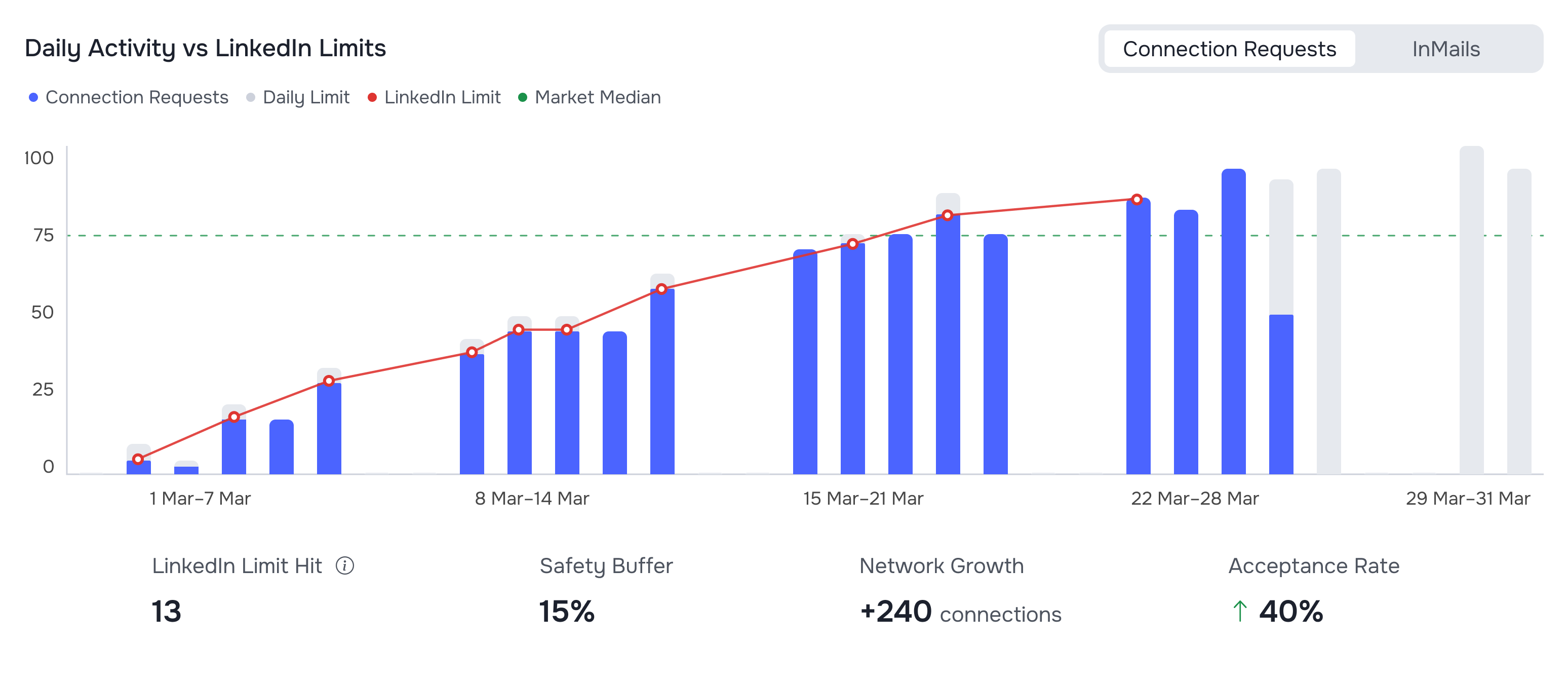
A fixed daily cap is a lose-lose: set it low and you waste capacity, set it high and you slam into LinkedIn's ceiling. Smart Limits randomizes sends and delays, watches for the LinkedIn cap, eases down before damage is done, then probes back up as the window reopens. Hitting the cap over and over is the #1 way accounts get logged out right now - this is the fix.
Smart Limits in GetSales: the system reads each account's health and sets the safe maximum for it.
Watch the whole fleet daily
The silent killer: an account quietly stops sending - no leads left in the campaign, locked out, broken import - and you find out a week later from your analytics. An agency dashboard that shows every sender's status, scheduled tasks and recent sends catches it the same day instead.
Watch this part: Smart Limits, the dashboard and renting profilesPeter · 4 min from the webinar
Add profiles instead of squeezing one
Don't push one profile to its absolute max - add more profiles and run lower volume on each. Safety beats intensity. For high-ticket offers with a working process, renting extra profiles is how teams scale to tens of senders fast.
PeterData quality
2
Every 5th connect lands on the wrong person
Most lists come from a database export. The problem: those datasets refresh about once a month. LinkedIn already knows people changed jobs - your data provider doesn't.
In a typical export, 10-20% of contacts are outdated, and another ~10% of people you actually want aren't in the dataset yet. Add wrong roles and wrong geo, and every 5th invite burns on someone who could never convert - while eating your daily limit.
The fix is fresh data plus verification:
- Pull from Sales Navigator, then re-enrich. GetSales enriches every imported lead: instantly from its own database - with the enrichment date shown, so you know exactly how fresh each record is - or in real time if the lead isn't there yet. Full step-by-step in our free guide: How to enrich 20,000+ leads for free.
- Let AI validate the list. Does this person's actual current title match the role you target, at this company? Push the enriched data to an agent and drop the junk before you spend a single connect on it.
- Filter out dead accounts. 500+ connections, has a photo, active on LinkedIn - and double-check location: Sales Navigator's geo filter lies more than you think.
The benchmark
Market average acceptance is ~21%. Historically 15-30% is healthy for cold outreach. Below 15% - this leak is where to look first. Acceptance is the top of your funnel: lift it a few points and everything downstream grows with it.
Watch this part: fresh data, re-enrichment and relevance filtersPeter · 5 min from the webinar
PeterOutreach strategy
3
You pitch, so nobody replies
Pitching a stranger loses ~90% of the audience instantly. The calendar-link-in-the-first-message era is over - today it reads as spam. Even the classic "are you facing X?" opener is dead: everyone asks it.
What everyone sends
"Hi! We're an automation tool that helps you send connections and messages on autopilot. Want to jump on a quick call?"
What actually gets replies
"Hey - we just pulled outreach benchmarks from 6M invites: real acceptance and reply rates, what volumes are normal now. Want me to send it over, so you can see where you stand against the market?"
That's the whole reframe: value first. Instead of asking a stranger to buy, you offer something they actually want - a benchmarks report, a deliverability breakdown, a guide built on real data. The reply changes from silence to "sure, share it" - and now you have a conversation. Pitch later, in message two: "by the way, this is what we do - relevant?"
Why this matters so much:
~5%
of your market is ready to buy right now
30-40%
will be in a buying window within a year
14.7%
reply rate on message 1 - it drops hard after (7.7% on msg 2, 4.2% on msg 3)
Only a sliver of your market can say yes today, no matter how good the pitch is. Value first keeps you in the room - trusted, remembered, not blocked - until their buying moment comes. And since replies decay fast with every follow-up, keep the sequence to 3-4 messages and make the first one count.
Watch this part: value first - why pitching stopped workingPeter · 5 min from the webinar
PeterChannel strategy
4
The silent 80% you throw away
Say ~20% accept your connection request. Most teams just forget the other 80%. That's the single biggest pile of wasted budget in outbound - you already paid for those leads with time, limits and list-building.
Rotate the sender
After 2-3 weeks, automatically re-approach the same lead from another sender profile. Wrong timing, wrong avatar, buried notifications - whatever the reason was, a fresh face converts another 2-7% of the "lost" bucket. Worth it whenever your addressable market is limited and every lead in the list cost you real effort.
Find their email - and send warm, not cold
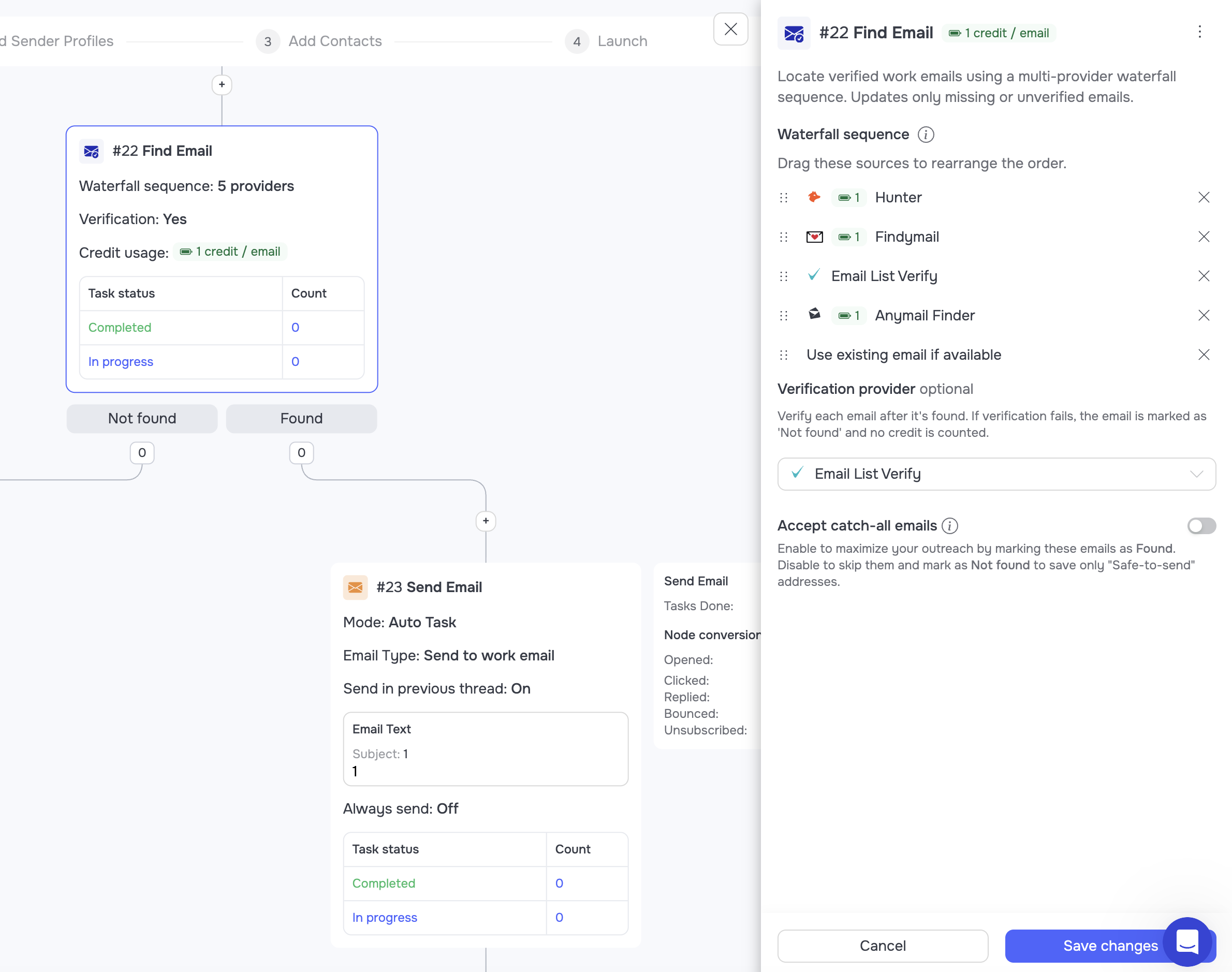
For roughly half of the non-connectors you can find a verified email. That's ~40% of your entire list back in play.
The Find Email step in GetSales: verified emails for the leads that never accepted.
And it's not a cold blast - just two warm emails that refer back to your connection attempt:
1
The bridge
"Hi - tried to reach you on LinkedIn, didn't work out. I put together a guide on [their pain] that might actually help you with it - want me to share it?"
2
The guide itself, a few days later
No reply? Send it anyway, softly: "Sending it over so you have it on hand - here's the guide. Hope it helps." No pressure, no "did you see my last email". Then they flow into the long-term nurture below.
Done this way - small scale, personal, value first - deliverability stays clean. The teams running this playbook see spam complaint rates below 0.01%.
Watch this part: sender rotation and the email finderPeter · 8 min from the webinar
HaraldNurturing engine
The nurturing engine: where the 10x compounds
Everything above fixes the front end. But the real multiplier is what happens to leads after the campaign - because 95% of them weren't ready to buy this month, and next month somebody will be.
Start by splitting every lead from your campaigns into 4 segments:
1Never connected
Didn't accept in 7-14 days. Not dead - maybe just not active. Goes to email + ads.
2Connected
Accepted, no dialogue yet. Nurture until timing is right.
3Connected + replied
In dialogue - work it to a call. If it cools down, back to nurture.
4Connected, never replied
Saw you, stayed silent. Timing was wrong - stay visible.
Then run all four through one engine:
10
10 resources → 20 emails → 20 weeks
Build ~10 genuinely useful assets: guides, benchmarks, checklists, templates, mini-tools. Write two short emails per asset - "we made this, hope it helps", zero pitch. One email a week. After week 20, loop back to the start: nobody remembers what they got 20 weeks ago. Set it up once, it runs itself.
$5
Retargeting ads for $5-10 a day
Same resources, turned into ads, shown to the exact leads from your outbound - the segments sync to Meta automatically. You stay visible between emails without a real ad budget.
🔥
Score every lead: cold → warm → hot
Opens, clicks, signups move leads up the ladder. Hot is the real buying signal: this person has consumed your content and is telling you they're interested. That's when sales reaches out - and the call books itself, because they already know and trust you.
Never pitch in the nurture
The emails share value. The ads share value. The resources themselves can be as product-heavy as you like - case studies, results, CTAs. That's the trick: the touchpoint is a gift, the asset does the selling.
Watch this part: the 4 segments and the 20-week nurture loopHarald · 9 min from the webinar
Rather have the software do all of this for you?
Try For Free
HaraldContent system
The content system: how to build your 10 resources
The engine runs on assets. "But I don't know what to create" is the #1 excuse - so here's Harald's exact process, the same one behind 500+ viral posts:
1
Map your offer - outputs, not features
Nobody buys a drill, they buy the hole in the wall. Write down the problems you solve and the transformation you deliver. Pen to paper, black on white - this document feeds everything else.
2
Build your content architecture
3-4 recurring themes derived from the pains you address. Don't guess what the market wants: Harald's team fed 355 sales-call transcripts into AI and pulled out the exact questions and problems prospects actually voice, grouped by segment. If you do sales calls, you already own this data.
3
Pick the format
Guide, checklist, template, webinar, prompt chain, mini-tool. Three types of valuable content: informative (teach it), implementation (help them do it - checklists, swipe files), output (do it for them - a tool that produces the result). Mix all three.
4
Draft with AI - but feed it your context cake
Have AI interview you, then write. Layer in your business, offer, audience, tone of voice, case studies and unique data. AI does the work - your expertise and taste are what make it different from every competitor using the same models.
5
You are the expert - do the QA
Never ship what you can't stand behind. AI polishes, you verify every claim.
6
Package and distribute
Host on your website (not just Notion) so you can track consumption. Every resource gets a video walkthrough on top - proof there's a human behind it. Every resource links to other resources - the rabbit hole effect. And every resource ends with a CTA: book a call, sign up, read the next one. Always.
Watch this part: the 6-step process to build lead magnets with AIHarald · 8 min from the webinar
HaraldProof
What this engine produces
This isn't theory - it's the exact system Harald's team runs at Buro Ventures, and the numbers it printed over one year of posting and nurturing, with zero ad spend:
65,000
inbound leads in one year
500+
viral LinkedIn posts in a single year
$0
spent on ads to get them
85-90%
of post commenters turn into full contact details after enrichment
The mechanics: a lead-magnet post collects comments, you export the commenters, enrich them in GetSales to get profiles and contact details - and feed them straight into the same outbound + nurture engine. Every asset you build keeps generating leads on both channels: outreach and content.
Watch this part: why value-first content winsHarald · 2 min from the webinar
Your 10x checklist
Score your own funnel - every unchecked box is pipeline you're leaving on the table:
- Smart Limits on, fixed daily caps off - stop the cap → logout → restriction spiral.
- Fleet dashboard checked daily - no account silently stalls for a week.
- Fresh data: Sales Navigator import + re-enrich + AI validation of titles and companies.
- Dead-account filters: 500+ connections, photo, activity, geo double-checked.
- Value-first opener, pitch waits for message two. Sequence capped at 3-4 messages.
- Sender rotation on the non-connectors after 2-3 weeks.
- Email finder on the rest - warm bridge email, not a cold blast.
- 4 segments, 10 resources, 20 weeks, looped - the nurture runs hands-off.
- Retargeting on, leads scored - sales called in only on hot.
The toolkit
The front end of this system runs in GetSales
SL
Smart Limits
Dynamic per-account limits that read account health, ease down near LinkedIn's cap and lift back as the window reopens - the safe maximum, automatically.
AD
Agency dashboard
Every sender's health, scheduled tasks and sent volume in one view - catch a stalled account today, not next week.
EN
Real-time enrichment
Every imported lead enriched instantly from the GetSales database or in real time - with the enrichment date on every record, so you know it's fresh.
RO
Sender rotation
Automatically re-approach non-connectors from another profile - recover 2-7% of the bucket everyone else throws away.
EM
Email finder
Verified emails for the leads that never accepted - turn the silent 80% into a warm second channel.
1S
Single session protection + Smart Login
One clean session per account, login without passwords or 2FA codes - the safety layer that keeps the whole fleet alive.
FAQ: outbound pipeline and conversion
Why isn't my outbound pipeline growing even though I send more?
Volume amplifies leaks. If acceptance, targeting, messaging or follow-up is broken, adding sends multiplies waste instead of pipeline - that is why the four leaks come before any scaling.
What is sender rotation and why does it matter?
It spreads one campaign across several sender accounts so no single profile nears its limit. The campaign scales while each identity stays inside safe, human-like behaviour.
Is LinkedIn plus email better than LinkedIn alone?
Yes, consistently. A prospect who already recognises your name from LinkedIn opens and answers email at materially higher rates - the second channel does recognition work, not repetition.
What is a realistic LinkedIn-to-meeting conversion rate?
Broad B2B campaigns land around 1-3% of total sends; tight senior-level targeting reaches 2-5%. Strong replies with weak meetings means the CTA is the leak, not the outreach.
What should I do with prospects who never reply?
That is most of your list - the silent 80%. Move them into a nurture track with spaced, value-first touches and a channel switch instead of more of the same message.
How fast can I actually fix these leaks?
Each is a configuration change, not a rebuild. Auditing an existing campaign against all four takes about an hour - hence the title.