Why cold email inboxes burn: the 2026 infrastructure guide
Who really decides inbox or spam, Gmail against Microsoft against Azure, the ESP-matching myth, warmup pools, domain burn and the sending numbers per inbox and domain, from the webinar with sending.ac.
Your emails get delivered. That's not the same as read.
The single most misunderstood thing in cold email: delivering is easy, inboxing is the whole game. An email can be technically accepted by the receiving server, land in spam, and no error message ever tells you. Nobody tracks it, so nobody knows.
- Delivered: the server accepted your email - the easy part
- Inboxed?: where it landed is a different equation, and it's invisible
Everything on this page is about closing that gap - based on what sending.ac sees across 6M+ tracked domains.
The spam police: who actually decides
Contrary to popular belief, the spam police is not a blacklist and not your sending server. The judge is whoever receives your email - and the world's inboxes are overwhelmingly Google and Microsoft.
That one fact explains most of the industry:
- Sending from Gmail or Microsoft means sending from their IPs. You inherit their reputation, and you're policed less strictly inside their own ecosystem. That's why they became the default for cold email.
- SMTP is the outsider. Your own server gives you maximum control and looks cheap - but you walk into Google's and Microsoft's ecosystem with zero reputation benefits, fighting uphill on every variable.
- An SMTP server is the easiest thing to set up and one of the hardest to make land. In Yannic's words: two years of R&D in, and they still haven't started marketing. Most teams that try to save 10x on infrastructure get exactly what they paid for.
Gmail, Microsoft, Azure: pick your IP reputation
"Microsoft inboxes" doesn't mean Outlook. It means Microsoft IPs - and you can get them two ways: Outlook, or Azure.
That difference matters more than most people realize. Azure sends from the same Microsoft IP space, so you keep the full reputation benefit - but you also get SMTP-grade control that Outlook and Google will never give you. That combination (outsider-level control, insider-level reputation) is exactly what sending.ac has spent two years building on.
Practical consequences:
- Google and Outlook inboxes are practically the same product these days - well isolated at most providers. The provisioning is commoditized.
- Azure allows far more inboxes per domain (see the 2026 numbers below) - which collapses your domain costs at scale.
- Google is the harshest, most dynamic spam judge. Its algorithms fluctuate faster than Microsoft's and they analyze the sending side too, not just what arrives.
The ESP-matching myth: cross-provider wins
The industry consensus says match the provider: Gmail to Gmail, Microsoft to Microsoft. The sending.ac data says the opposite works better - and this insight was published on this webinar first.
The logic, once you see it, is simple. If you send Gmail to Gmail, Google is the spam police on both ends: it scores your sending behavior AND judges you on arrival. An outbound-only inbox that barely receives anything looks suspicious from the sending side alone. Send from a Microsoft IP into Google, and only half of that surveillance applies - the receiving half.
- Gmail → Gmail: Google judges you twice: as sender and as receiver
- Azure → Gmail: strong IP reputation, and the judge only sees half the picture
Enterprise spam filters: when email can't get in
Best rule of thumb from 6M domains: the bigger the headcount, the harder the filters. More employees means more internal policies, and Fortune 500-grade companies filter cold email aggressively.
Mass-emailing enterprise targets doesn't make sense. What works instead:
- Go conservative and isolated - low volume, clean setup, every best practice followed. The filters cut the average sender. Being "plus one" above average is what gets through.
- Support the touch from every side - a real profile, real content on your feed, a recognizable name. Filters judge the message. People judge you.
- Run enterprise accounts on LinkedIn in parallel.
Inbox providers vs sequencers: what you're actually buying
Two different purchases people constantly mix up: the inbox provider (sending.ac, Zapmail - the infrastructure) and the sequencer (Instantly, Smartlead, EmailBison - the tool that sends).
The uncomfortable truth about providers: the inboxes themselves are mostly the same now. Isolation used to be a differentiator. Today most providers isolate well enough. So what should you actually choose on?
What's commoditized
The provisioning: domains, inboxes, DNS setup, basic isolation. Good enough almost everywhere.
What differentiates
Observability: do you know when things break, why, and what to do next? Features, data and analysis on top of the inbox - that's the hard layer.
The industry's biggest problem is a lack of transparency - not from ill intent, but structurally. Something stops working, and the finger pointing starts: is it the sequencer? The inboxes? The list? The copy? Nobody can see across the boundary. Whoever gives you data across that boundary is worth paying for.
Warmup is not a checkbox
Warmup is the second most important variable in cold email after infrastructure - and almost everyone treats it as a toggle they switched on once. "I got warmup on, did my part." That's exactly how domains die.
Composition is the whole point
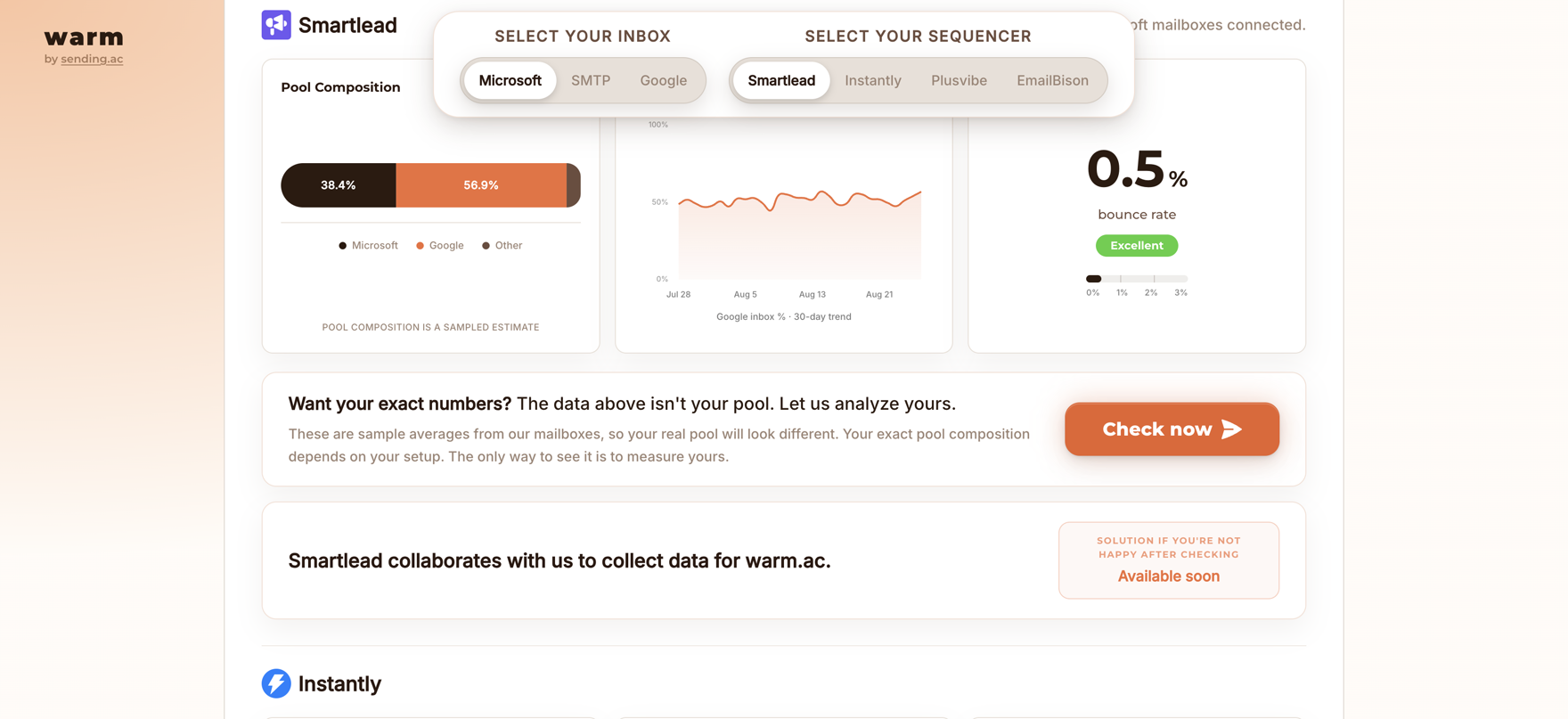
Say your lead list is 100% Google inboxes (most are - Microsoft gives senders a hard time). If your warmup pool is only 15% Google, you are not warming where you need to land. The track record you're building is with the wrong judge.
sending.ac tracks the live warmup composition of the four big sequencers publicly at warm.ac - pool composition, Google share trend and bounce rate per sequencer, updated regularly:
Pools, shards and why a referee matters
A sequencer's warmup pool is made of its own users - good actors, average ones, and hostile ones uploading garbage. To protect the good users, sequencers segregate the pool into shards: sub-pools of similar quality. Land on SURBL or another blacklist and you can get quietly moved to a worse shard - and you'll never know which shard you're in.
That's why warmup can't be graded by the sequencer that runs it. It needs a third party as referee - which is exactly the gap warm.ac exists to fill.
Does warmup even pay off? The honest data answer
The webinar's host pushed on this: years ago he A/B-tested warmup on and off and saw no reply-rate difference. Yannic's answer, from the full dataset, is more interesting than either camp:
- Without warmup, reply rates are actually slightly higher - for days, maybe two weeks. Less total volume means fewer negative track records accumulating at first.
- Then the domain burns much faster. Warmup accumulates good-behavior points that outweigh campaign negatives. Without it there's nothing on the positive side of the ledger.
- Economically warmup wins - the alternative is buying new domains and inboxes on a much shorter replacement cycle.
Domain burn: the one rule that prevents it
Asked for the top 3 causes of domain burn, Yannic refused: there are hundreds, not three. But first, what burning actually means: a burned domain is simply a domain that stopped inboxing. Not necessarily blacklisted - just landing less and less.
Since you can't monitor hundreds of variables, the one rule that beats all of them:
And the structural version of the same rule - the single best insurance in cold email:
- 5,000: emails a day you need to send
- 15,000: infrastructure capacity to buy, rotated in and out of warmup
Run infrastructure for 3x your need and rotate: batch A sends while batches B and C rest in warmup, then swap. Every domain gets recovery time, momentum stays on healing, and no single failure can dent your volume. On Azure-style economics (many inboxes per domain), this costs far less than it sounds - and it's how sending.ac's happiest agency customers run.
The real 2026 sending numbers
The numbers people quote (20-30 outreach emails per inbox) miss the point: the cap is total sends, warmup included. Blast 30 outreach plus 50 warmup and you're overkilling the inbox.
- 2-3 inboxes per domain on Google / Outlook
- ≤30 total emails per inbox a day (outreach + warmup, roughly 15+15)
- 50-75 inboxes per domain on Azure, 10-15 total emails each
- 2-4 outreach emails a day per inbox is what sending.ac itself runs (10-12 total)
There was a time 50 total per inbox was fine. That time is over - go lower, and let the volume come from more inboxes, not hotter ones. The Azure math is what makes that affordable: one domain carrying 50+ inboxes instead of 2-3 collapses your per-send domain cost.
Follow-ups: two, not five
Every extra follow-up is another chance for the wrong person to hit "mark as spam" - the metric you want near zero. The play: 2 touches, then stop. Recycle the lead four weeks later with a different offer instead of message five of the same one. Maximize replies, minimize anger.
Where to buy domains
- Always .com. Its abuse rate is ~5% because of sheer volume. Some cheap TLDs (.info, .click) run 40-50% abuse - an ESP seeing that TLD starts you at a penalty.
- Buy where others don't. Registrars carry reputation too - a domain from the registrar every spammer uses is a signal in itself.
- Space out purchases and diversify - bulk-registered batches are a known blacklist trigger. Or buy through a provider that diversifies for you.
Unsubscribe, GDPR and open tracking done right
The unsubscribe question has a trap in it: add the link and you've turned your email into HTML - and HTML means marketing email to every classifier. Same for the word "unsubscribe" at the bottom: it tells any basic algorithm exactly what kind of mail this is.
The deliverability-safe way to stay compliant:
- No unsubscribe link, no HTML. Plain text, human-written, human-looking.
- Give a reply-based escape hatch instead - and make it part of the CTA, not the footer: "Reply 1 if interested, 2 if not." Same opt-out effect, zero spam-mark anger, and your reply rate (the one metric that matters) goes up instead of down.
- Keep the PS line free - it's the strongest converting area of the whole email. Don't waste it on legal boilerplate.
What the CTA looks like in practice:
The deliverability-safe close: Worth a look? Reply 1 and I'll send it over - reply 2 and I won't email you again.
PS: we pulled this from 6M tracked domains, so you can see exactly where your setup stands.
Open tracking: turn it off
Open tracking adds the same marketing-email signature - and the data it gives you is garbage anyway. Apple's mail app has auto-opened emails for years. AI agents skim inboxes now. You're sacrificing deliverability for numbers that mean nothing.
Your email infrastructure checklist
Score your own setup - every unchecked box is deliverability you're leaving on the table:
- No self-hosted SMTP unless deliverability isn't your main concern (it is).
- Strong IP reputation: Google, Outlook or Azure - and consider Azure for control plus inbox-per-domain economics.
- Test cross-provider sending - Microsoft IP into Google inboxes - instead of ESP matching. No abrupt target switches.
- Warmup composition matches your lead list - check your sequencer's pool at warm.ac.
- 3x infrastructure, rotated - domains cycle through warmup before they degrade, not after.
- ≤30 total emails per inbox a day on Google/Outlook, warmup included. 10-15 on Azure inboxes.
- 2 follow-ups max, recycle with a new offer after 4 weeks.
- .com domains, quiet registrars, spaced purchases.
- Plain text only: no unsubscribe link, no HTML, no open tracking. Reply-based opt-out in the CTA.
- Optimize one metric: reply rate.
FAQ: cold email infrastructure and deliverability
How many cold emails can I send per inbox per day in 2026?
10-30 TOTAL emails per inbox including warmup on Google and Outlook (2-3 inboxes per domain), roughly split 15 outreach / 15 warmup at the top end. On Azure inboxes 10-15 total each, with 50-75 inboxes per domain. sending.ac itself sends 10-12 total with only 2-4 outreach.
Does email warmup actually work?
Across 6M+ tracked domains: reply rates are slightly higher WITHOUT warmup for the first days, but the domain then burns much faster. Warmup accumulates good-behavior track record that outweighs campaign negatives, so economically it wins - if its composition matches where your leads actually are.
Should I send from Gmail to Gmail?
The data suggests the opposite of ESP matching: sending from a Microsoft IP (Azure or Outlook) into Google performs better, because Google otherwise judges you on both the sending and receiving side. Avoid abrupt switches of target provider - volatility itself is a risk flag.
What does it mean when a domain is burned?
A burned domain is one that stopped landing in the inbox - not necessarily blacklisted. Prevention beats repair: keep volume conservative, rotate domains back into warmup proactively, and run roughly 3x the infrastructure capacity you need so every domain gets recovery time.
Should cold emails have an unsubscribe link?
No. The link forces an HTML email, which classifiers read as marketing, and the word unsubscribe itself flags the message. Use a reply-based opt-out built into the CTA instead - for example reply 1 if interested, 2 if not - which satisfies the same opt-out purpose without the spam signals.
Is open tracking bad for cold email deliverability?
Yes. The tracking pixel adds a marketing-email signature, and the data is meaningless anyway - mail apps and AI agents auto-open messages. The only metric worth optimizing is reply rate.
Last updated: August 2026