


This is part two, hacks sixteen through thirty two. If you have not read the first fifteen yet, start there: part 1 of 2.
Your network and your profile do half the selling (continued)
Recycle the whole addressable market
If a connected network produces higher reply rates, then connecting to your entire market is a standing campaign, not a project. Run it: connect, wait, withdraw what was not accepted, rotate from the top with the next sender, repeat.
AutomateRevOps, an agency and a customer of both products, uses GetSales to connect with their whole addressable market on a loop, then nurtures that network with Extrovert. The outbound builds the audience, the commenting keeps it warm.
Send blank connection requests by default
The most divisive question of the session, and the honest answer is not the one either camp wants.
Peter's first pass at the benchmarks suggested blank notes win clearly. After recalculating, accept rates with and without a note came out close enough that he has not published the split, and he says so out loud rather than picking the convenient number.
What is not ambiguous is the shape of the distribution:
- Blank is the safe default, and it is what GetSales ships with. Nothing to object to, nothing to get wrong.
- A note with a genuinely good reason beats everything. A referral note, "X told me to reach out about Y", runs at 60-80% acceptance. If you have that, use it.
- A note with filler is worse than nothing. It gives them a reason to say no before they have seen your profile.
If a blank request stalls, the recovery path is another sender, a different text, an InMail, or email. Not a longer note.
Fix your picture and your headline
Before anyone accepts, they look at you for about two seconds. Peter pulled up his own pending requests live and read them out. Most were unreadable.
- Picture: open face, clean, ideally smiling. If your rate is not landing, test other profiles. It moves the number whether you like it or not.
- Headline: pick one thing. An offer they would want, an achievement, humour, or something personal they can relate to. Even "sales manager" is clearer than a mishmash, though it does read as selling.
- Not a mishmash. Cramming the title, the company, three value props and an emoji in means nobody can tell who you are or what you want. Most people do this.
The two requests Peter said he would accept both led with a plain offer: Google mailboxes from $1.80, and a cheaper alternative to a tool he already pays for. No cleverness required.
Let your profile do the selling
They click through before they accept, and they keep seeing you afterwards. That makes the profile the one asset that works on every lead in every campaign at once.
- Banner: say what you do and why it matters. It is the first thing under your name.
- Posts: show which pain you solve. After the connect, your content lands in their feed whether they ever reply or not.
- Keep showing up: the connection is not the end of the impression, it is the start of it.
A small network does not lower your acceptance rate. Your limits may be smaller, but the connection rate holds, and a small focused audience is the better outcome anyway. You do not need 10,000 connections before outbound starts working.
Nurturing before outreach: the comment-first play
Oleg Sobolev built Extrovert as a nurturing layer rather than a sequencer: no automation running on its own, just suggestions for comments and DMs that you approve. Everything below comes out of anonymised LinkedIn activity across Extrovert users.
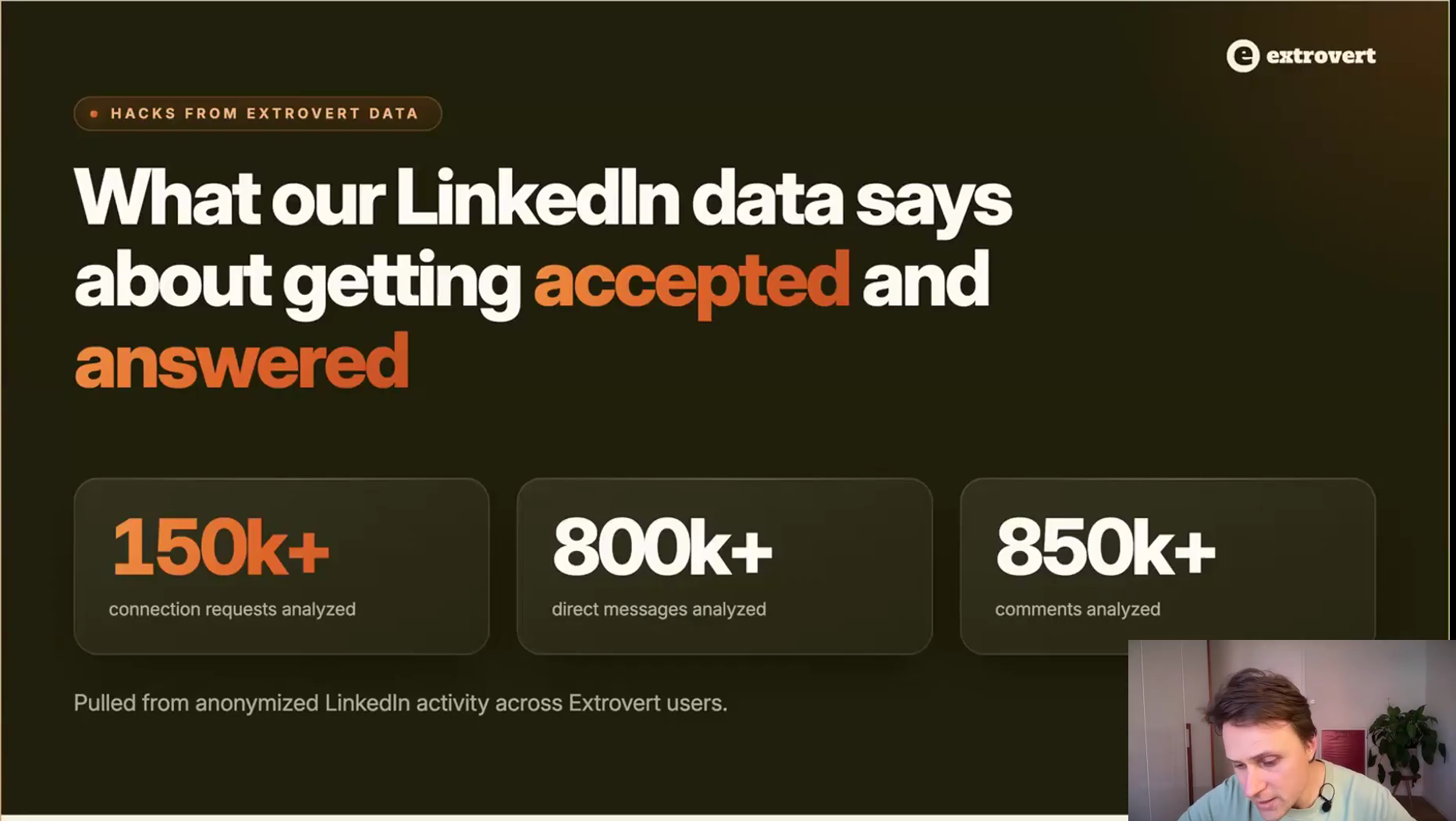
The sample behind Oleg's half of the session.
The premise is simple. You can warm prospects up before you reach out, and you can keep nurturing them after they reply, or after a demo that did not convert. Both halves are worked separately.
Comment before you send the request
The blunt question first: do comments actually move acceptance rates? On Extrovert's data, yes, and the size of the lift is the reason this is hack number one on their side.
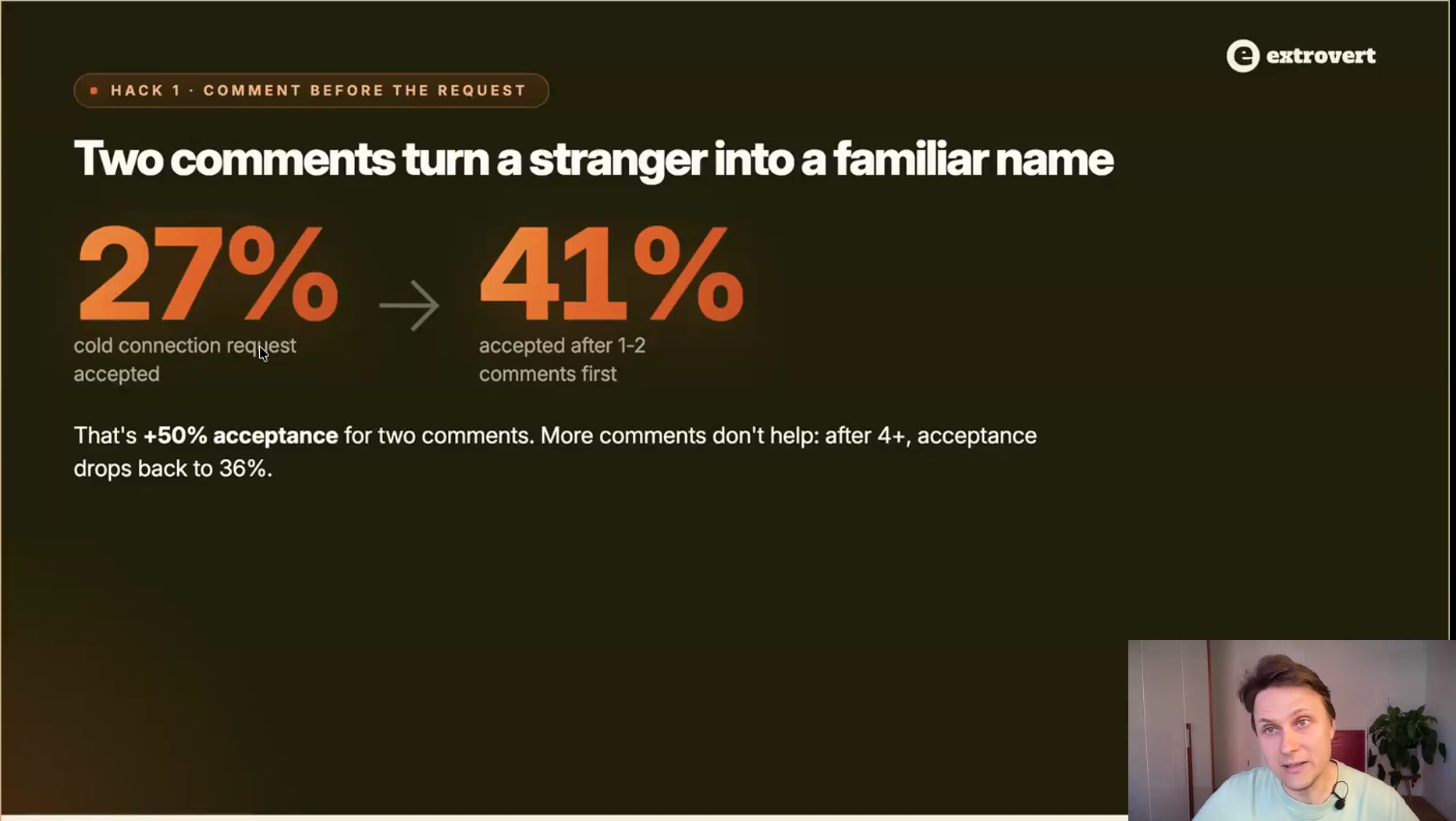
A 50% lift in acceptance for two comments. Individual accounts run higher, but this is the average to plan against.
The mechanism is not complicated: they have seen your name and your face in a context where you said something useful, so the request arrives from a familiar name rather than a stranger.
Two comments, not one and not five
One comment is not enough to register. And more is not better: past four comments acceptance falls back to 36%, so the extra effort actively costs you. One or two is the whole play.
Comment once
On a post where you have something real to add, not a "great insight" line.
Space it out, then comment again
One to two weeks later, on a second post. Two touches is where the curve peaks.
Then send the connection request
The invite lands warm, and the pitch comes after that, not with it.
In Extrovert this runs off a custom feed built from your own prospect list: it pulls their posts, summarises what the post is arguing, and drafts a comment in your voice from your context rather than from a generic model.
Send the request the same day you comment
This is where most people give back the lift they just earned. Attention is short. Comment on Monday, send the request the following Monday, and they have no idea who you are.
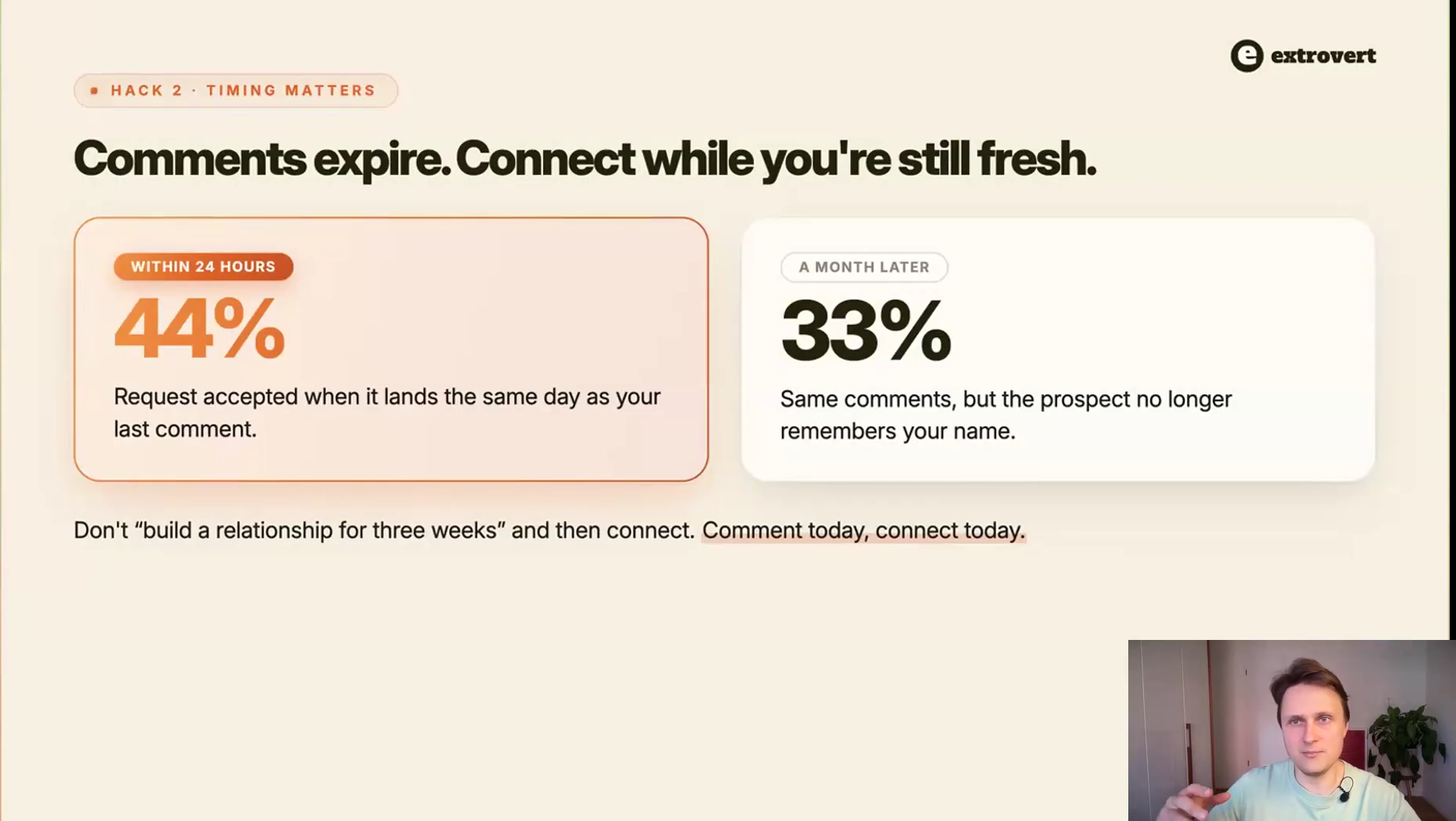
Comment today, connect today. Do not "build a relationship for three weeks" and then send the request.
Extrovert automates the connect request straight after a comment for exactly this reason. Doing it by hand, work in same-day batches: comment in the morning, send the requests in the afternoon.
This does not clash with hack 5. What pattern-matching flags is the robotic visit-like-connect burst, three machine actions in a row. A comment is a human touch on a real post; the request after it reads as the natural next step.
Prioritise people who actually use LinkedIn
Obvious in hindsight, almost never built into the list. On Extrovert's data, how active the prospect is on LinkedIn is the single strongest predictor of whether your request gets accepted. It sits on a different gate than hack 11: activity decides whether the request lands, relevance decides whether anything comes of it after. You need both.
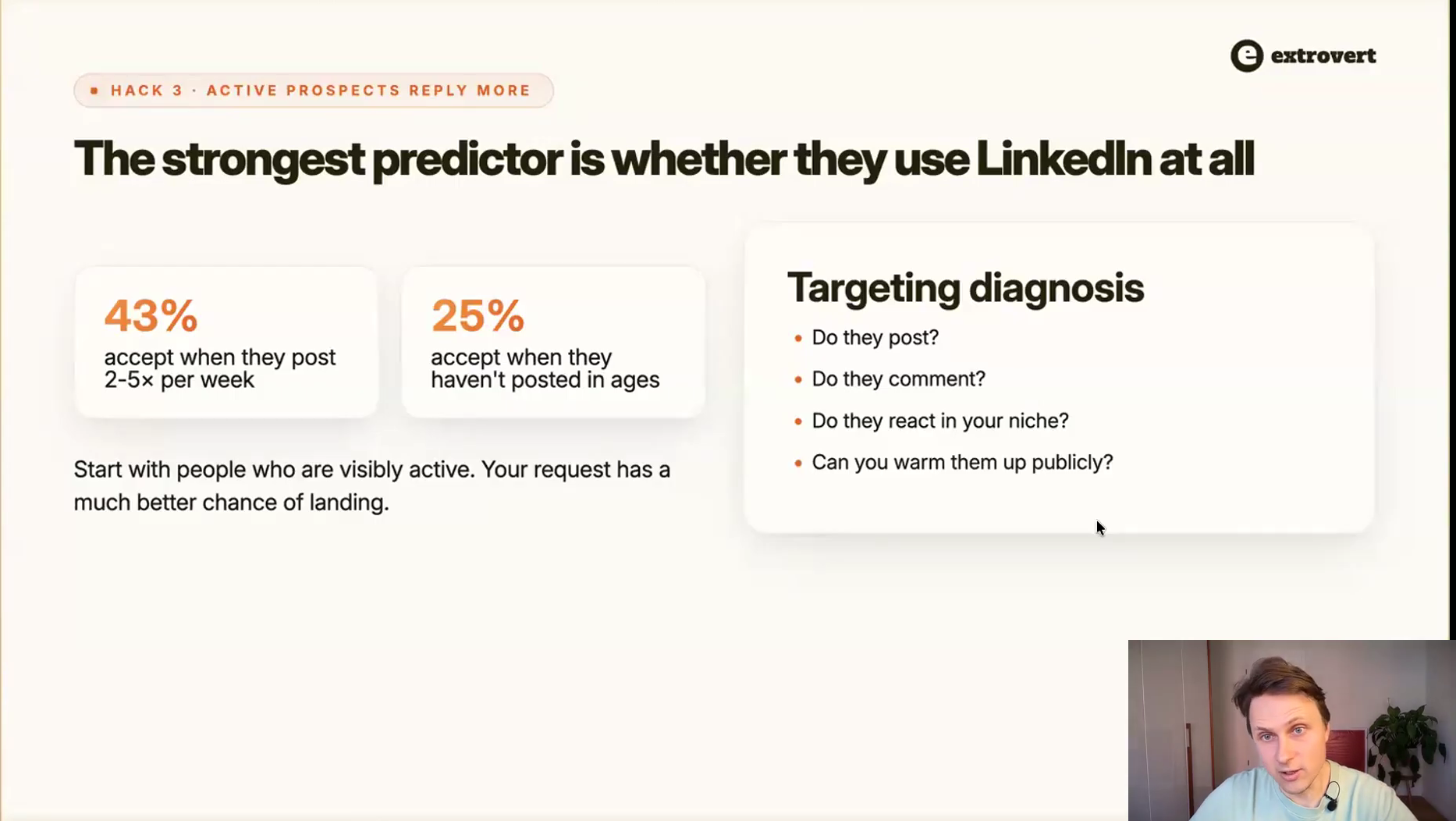
The targeting diagnosis: do they post, do they comment, do they react in your niche, can you warm them up publicly?
Finding them is the fiddly part. The Sales Navigator "posted on LinkedIn" filter is, in Oleg's words, crap: it counts reposts and surfaces posts from five years ago, so it says almost nothing about current activity. Extrovert's own filter shows how often a prospect posts, when they last posted and when you last commented on them. Clay enrichment is another route if you already run it.
If you sell into offline industries where nobody lives on LinkedIn, this hack is not available to you. Hack 25 is the workaround.
Write a first message of 150 to 300 characters
Very short and very long both underperform. The band in the middle gives the prospect enough context to answer without asking for attention they have not agreed to give yet.
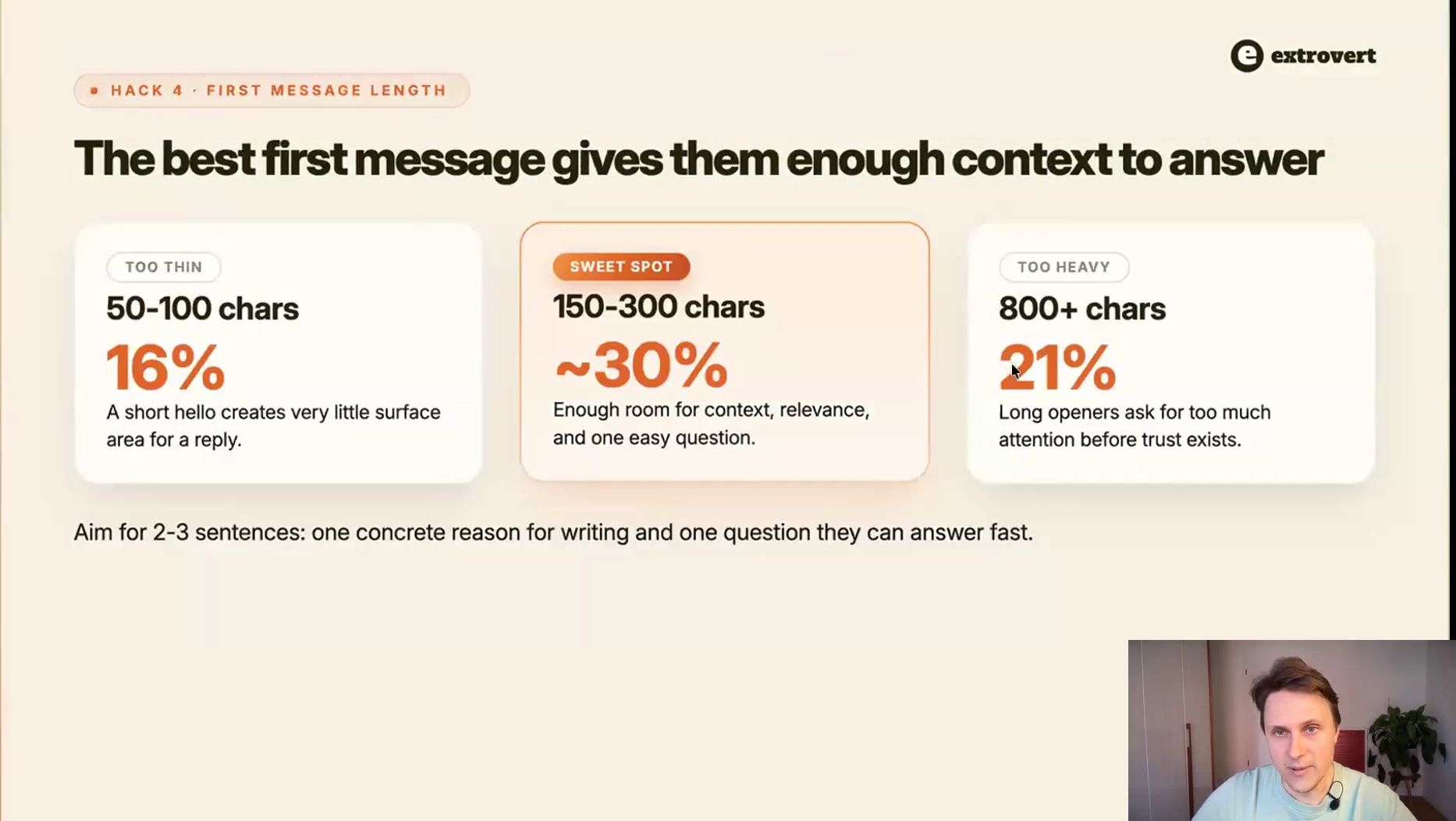
Aim for two or three sentences: one concrete reason for writing, and one question they can answer fast.
It is an average, not a law. A one-line joke can beat everything if it is genuinely funny. But without a reason to break the pattern, that is the band to write into.
To be clear on where this applies: this is the first DM after they accept. The connection request itself stays blank by default, per hack 17.
When they do not post, warm them through their orbit
Extrovert calls it indirect engagement, and it rescues every prospect who never publishes anything: instead of commenting on them, you comment in their orbit. Colleagues' posts, the industry voices they follow, threads they like, posts they comment on.
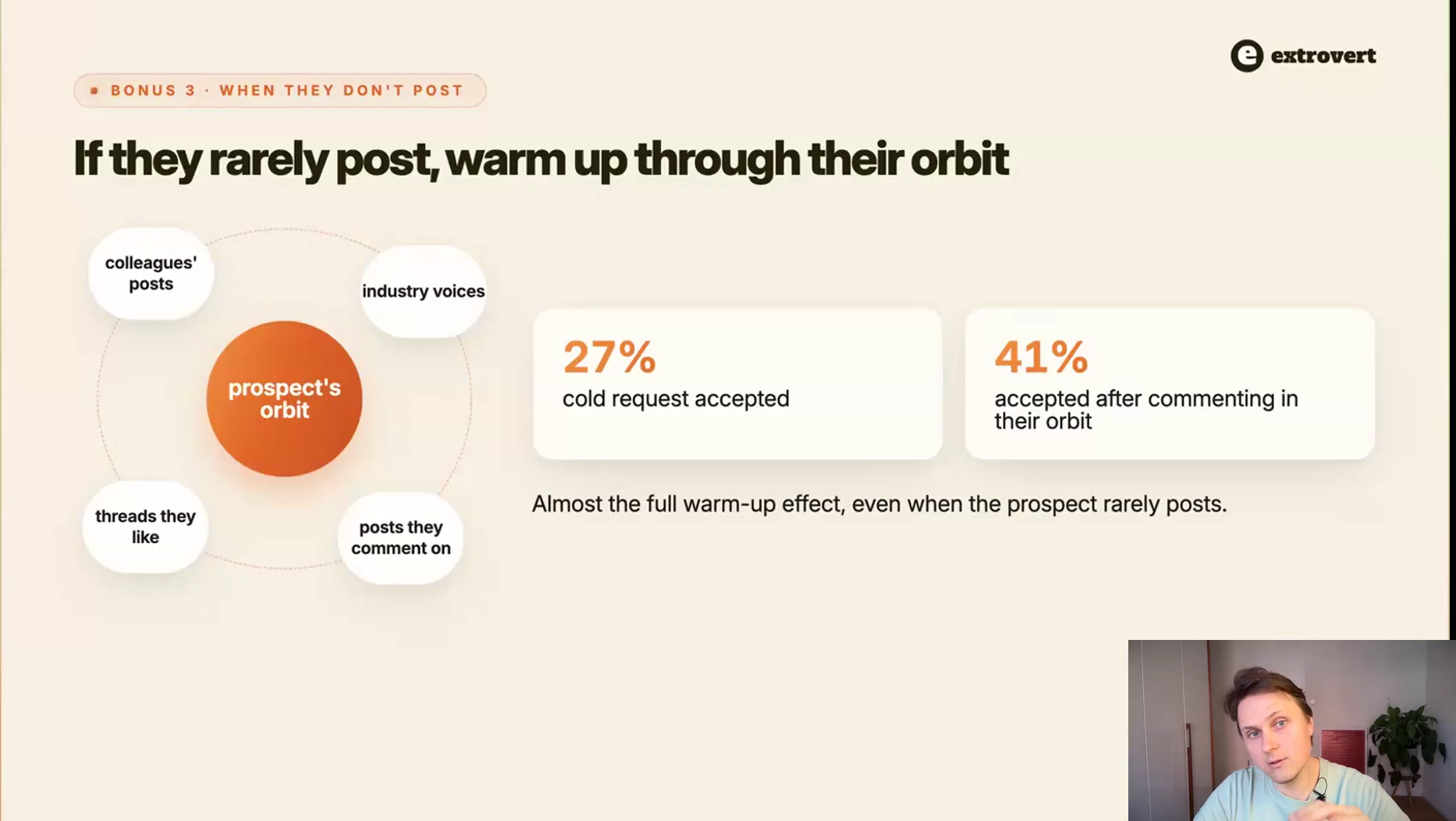
27% to 41%, almost the full warm-up effect, even when the prospect rarely posts.
You have seen the mechanic from the other side: when a connection of yours comments on someone you follow, their comment lands in your feed. There is no guarantee a specific prospect sees a specific comment, and at scale that does not matter. The number holds.
Nurturing after outreach
The second half is everything that happens once the conversation exists, or once it should have and did not: the follow-ups, the speed, and the discipline that keeps AI-assisted commenting from backfiring.
Keep a human in the loop on AI comments
Peter asked the question the whole market argues about: can commenting be fully automated? Oleg, whose company would benefit commercially from saying yes, said no, one hundred percent no.
He has tried the top off-the-shelf models and fine-tuned his own. They still miss, and the misses are subtle enough to give the whole thing away. His own working ratio: he approves about 70% of drafts as they are and edits the other 30%, usually by deleting a clause or fixing the line breaks.
- Inside jokes. AI has no idea it is walking into one.
- Sensitive posts. Someone is ill, someone shares a personal story. An automated comment there does real damage.
- Uncanny valley in general. Your whole goal, as Peter said in his half, is not to look like a sequence. People are allergic to sequences.
The goal is not zero human effort, it is low effort per prospect. Less time per touch means more touches, sustained for longer, across more people. That is what compounds, not the automation percentage.
Follow up about their world, not yours
On a follow-up you have two options: talk about yourself, another angle, another value prop, or talk about what is happening to them right now. On Extrovert's data the second one is worth 5 to 8% more replies.
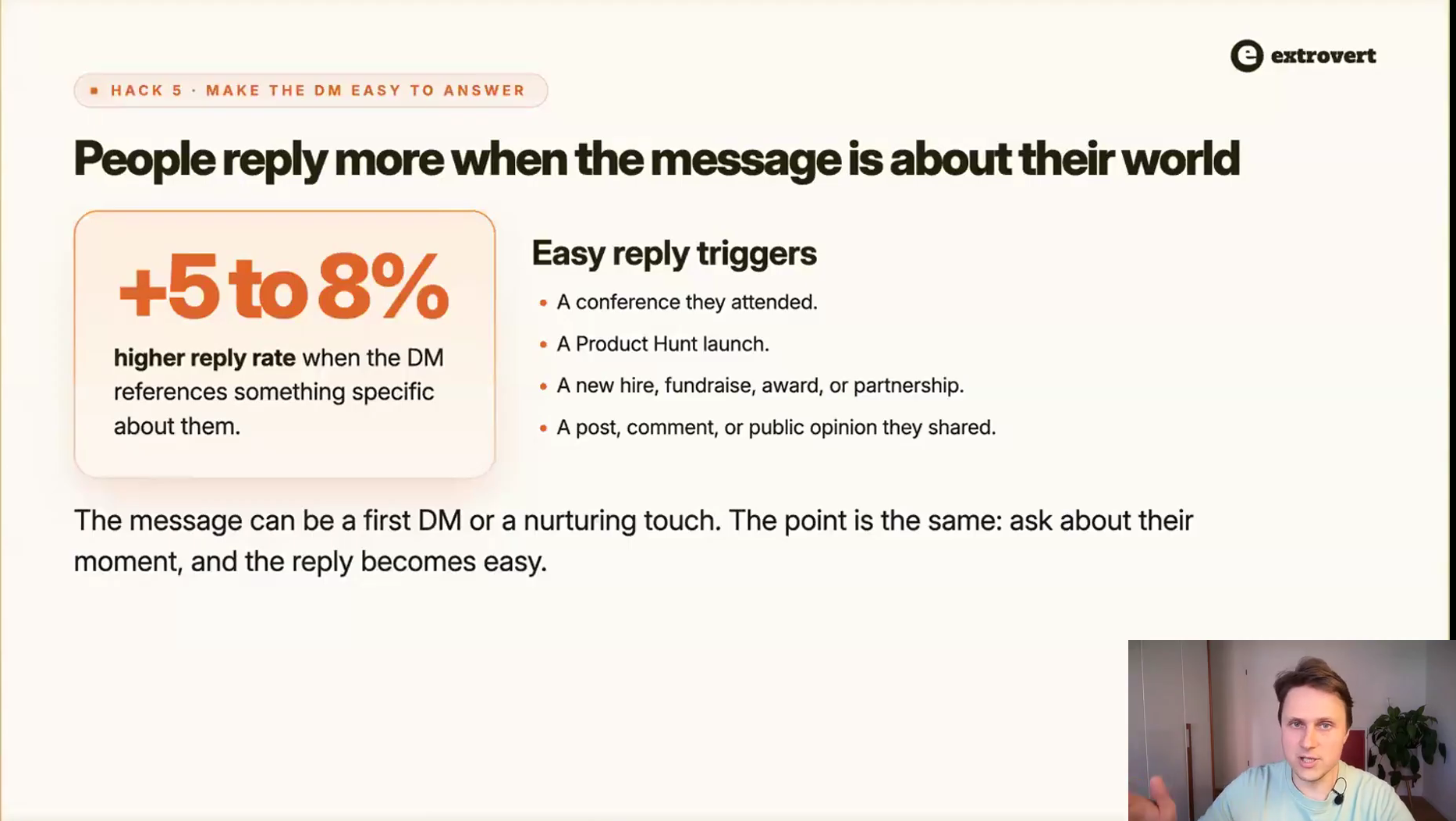
Easy reply triggers: a conference they attended, a Product Hunt launch, a new hire or fundraise, a post or opinion they shared.
Extrovert listens for those, decides whether the post is actually relevant to what you sell, and drafts the DM off it.
"Saw the Demand Compass launch coming Aug 5, the two-axes awareness versus readiness is exactly the stuff I'd love to unpack in a webinar together. Worth a quick chat?"
The variation worth stealing is the one where you do not mention your offer at all: "saw you had a Product Hunt launch, did it go well? Get any users?" Plenty of people answer that. Once they have, the conversation exists and you can steer it.
Sometimes you only need a reply, any reply
Oleg's bonus hack, and the most counterintuitive thing in the session. A reply is a very strong signal to the LinkedIn algorithm. Once someone answers you, it starts putting your posts in front of them, and it is a stronger signal than replying to their comments.
You have probably noticed it from the other side: DM someone and their posts follow you around the feed for weeks.
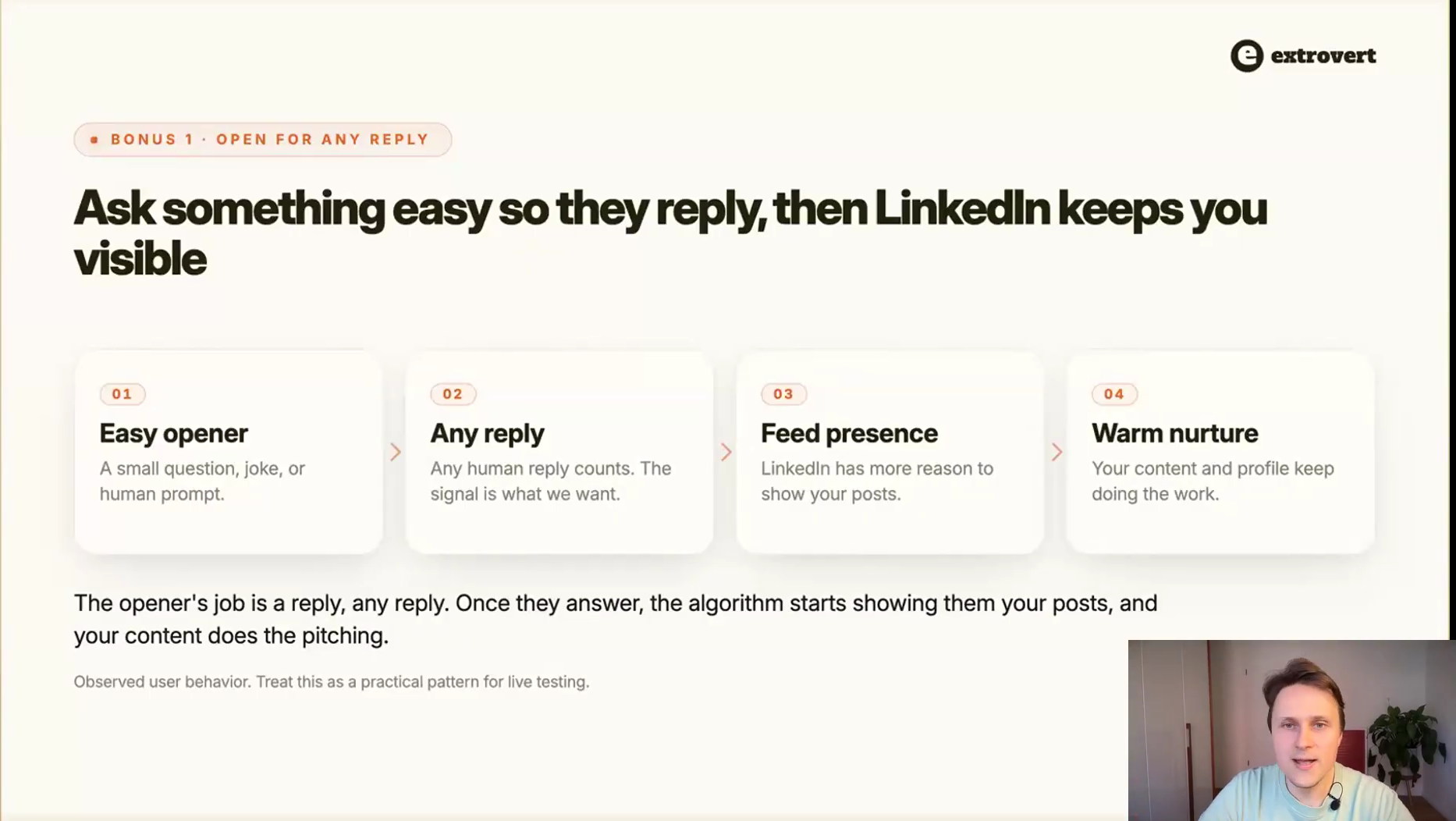
Easy opener, any reply, feed presence, warm nurture. The opener's only job is to get answered.
One Extrovert user cracks jokes that have nothing to do with what she sells. People reply "haha, love it", and she does not follow up at all. The algorithm now puts her content in front of them and her posts do the selling. She circles back a month later.
Oleg frames this one honestly as observed user behaviour rather than a controlled measurement. Treat it as a pattern worth testing, not a benchmark.
This is also where the two halves of the webinar meet: comments, DMs and your own posts are a triangle. Each one amplifies the other two, and none of them works nearly as well alone.
Answer within the hour
Once a prospect replies, treat it as a live conversation rather than a queue item.
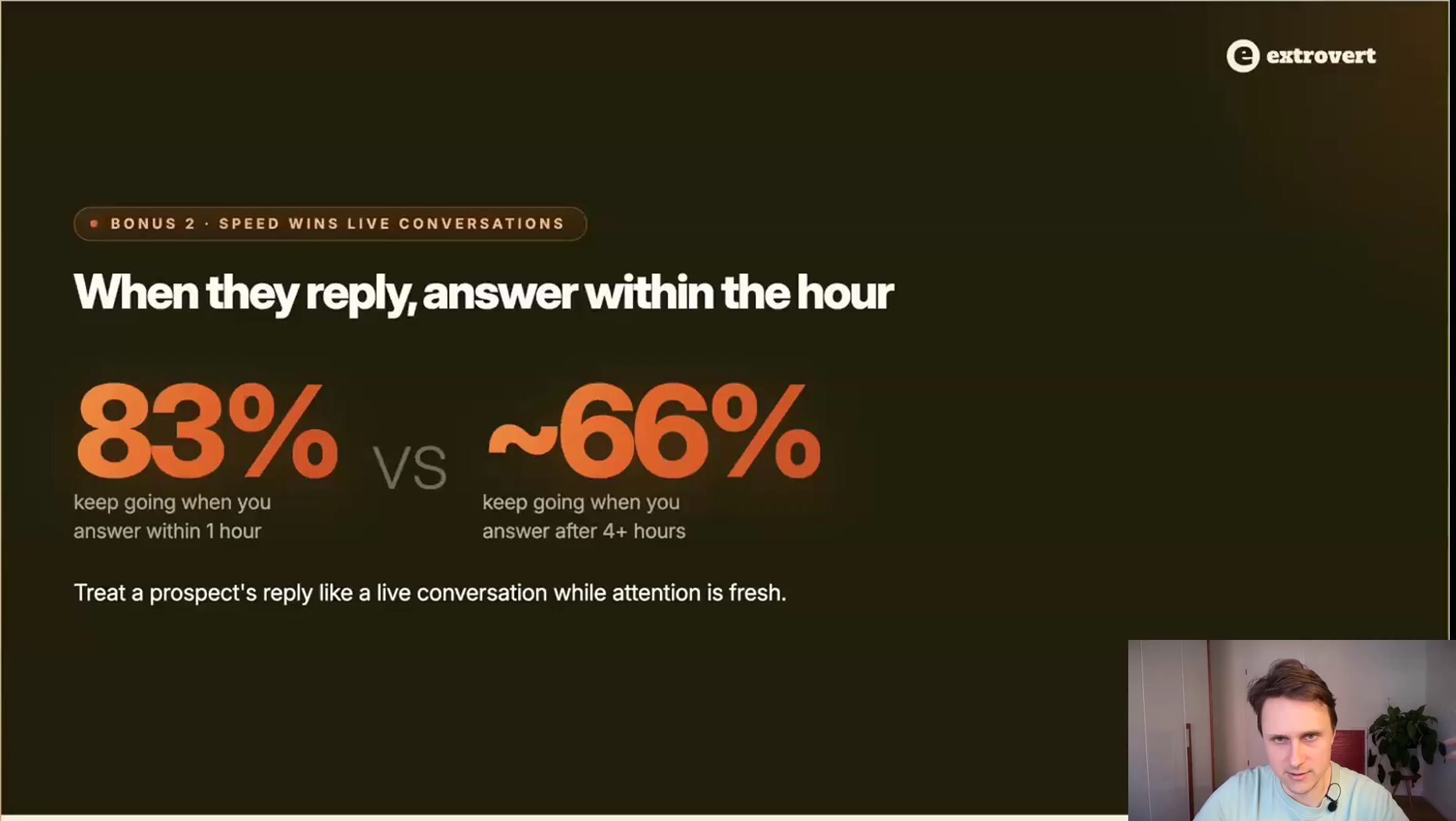
A sixth of your live conversations die purely from response time.
This is the hack most teams fail on for structural reasons: replies land across five sender accounts and nobody is watching all of them. Fix it with a unified inbox rather than with discipline.
Split your message the way you text
Sending two or three short messages in a row, the way you would on your phone, sometimes lifts reply rates over one packed paragraph. It reads like a person typing rather than a template arriving.
Two caveats, both from the webinar. It gets overused, so it will not work for every audience. And Peter's point in return: multiple notifications annoy people, which is roughly the same trade-off as it being more human, so treat it as a test rather than a rule.
Drop two rules that the data does not support
- "Send requests on weekdays only." Across 127,000 requests, acceptance is 30% on every day of the week. Zero difference. Send when you are ready.
- "They might still accept." 89% of acceptances happen within 14 days. After two weeks it is not patience, it is capacity sitting idle. Withdraw and move on.
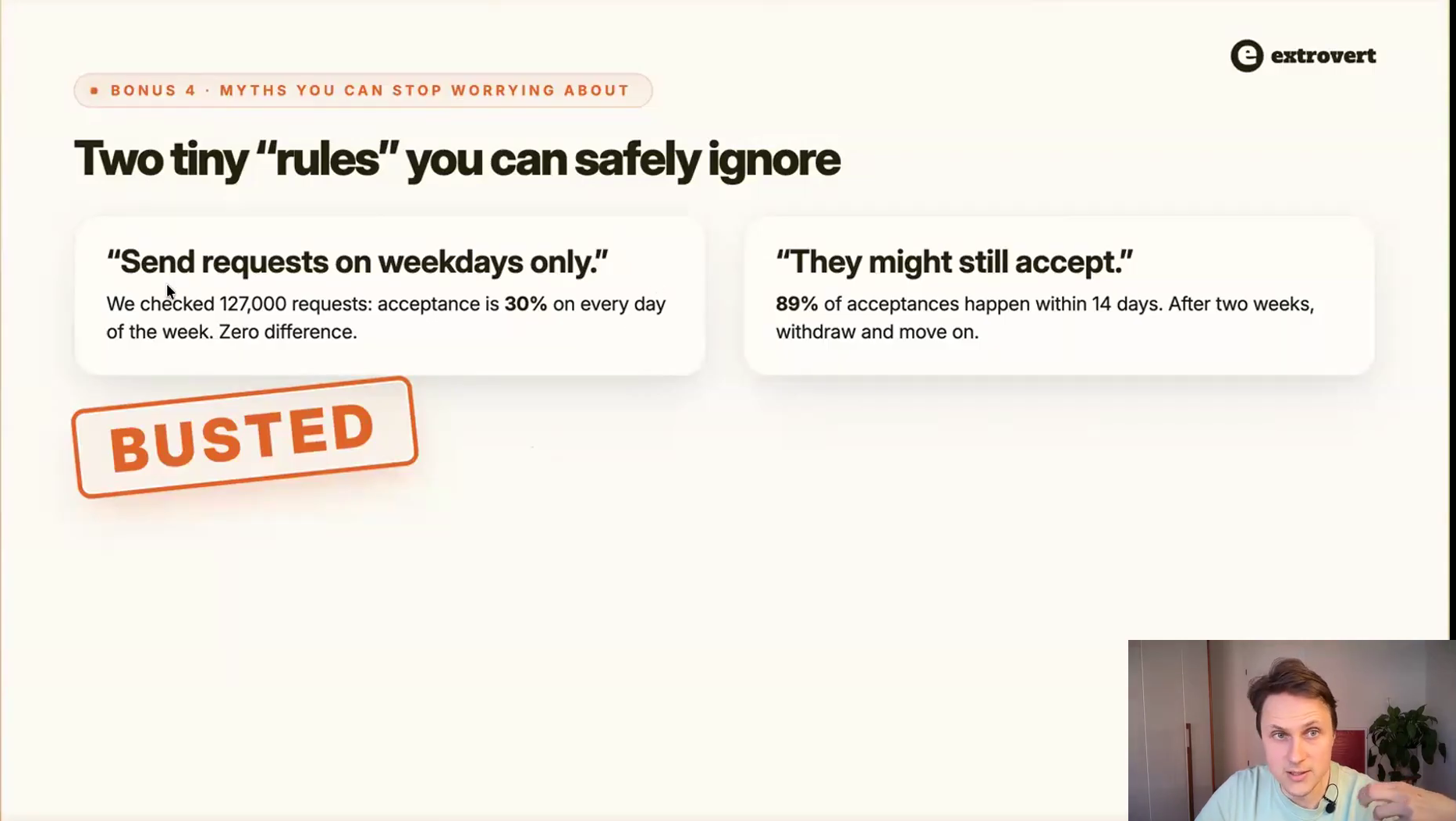
Two rules you can safely ignore, both checked against Extrovert's own request data.
Withdrawing stale invites is also what makes hack 16 possible: recycled leads come back around from a different sender instead of sitting in a queue forever.
You can comment more than you think, if the comments are good
The most-asked safety question of the session: how many comments before something bad happens?
- Up to 100 a day is fine for an account that is already active. Do not jump there from zero, ramp your activity the way you would ramp sending.
- Quality beats quantity, and it is not close. Comments are public. Slop damages the reputation you are commenting to build, so it does worse than nothing.
- A comment rate limit is not a restriction. LinkedIn sometimes says "you cannot comment until tomorrow". Extrovert sees no link between hitting that and accounts being restricted, and plenty of people who use no tool at all hit it too.
Your acceptance and reply checklist
Thirty two hacks is a lot to hold at once. These are the boxes that move the number fastest. Every unchecked one is a gap between you and the top 10%.
- You know your own accept and reply rate and can compare it to 21% and 22%.
- Your offer is concrete enough to be a no-brainer, or your opener is a give with a yes-or-no question attached.
- Three follow-ups, not one and not six.
- No links and no video before the first reply.
- Variables are cleaned, and nothing fires back-to-back. A day or three between the connect and the message.
- Two or three offer variants in rotation, with spintax, and someone actually looks at the open rate.
- The list is cleaned and bucketed before the first invite: one persona, one geo, enriched, no influencers, no right-title-wrong-company.
- Signals carry intent, not attributes, and never replace relevance.
- InMails and email cover the people who never accept.
- Smart Limits are on and no automation is starving.
- 1st-degree leads get their own message from the sender who already knows them, and unaccepted invites recycle instead of expiring.
- Your picture and headline pass the two-second test.
- Two comments before the invite, and the invite goes out the same day.
- Follow-ups reference something happening to them, and replies get answered within the hour.
- A human still approves every AI comment.
The outbound half runs in GetSales
AI variables and icebreakers
Normalise messy fields on the fly and generate icebreakers from the headline, the About section or a recent post, with fallbacks.
Real-time enrichment
Fresh company, title, geo, network size, open-profile status and primary language on every lead before it enters the sequence.
Smart Limits
Reads each account's own moving cap, eases down near it and sends the safe maximum. Warm-up included.
Sender rotation and prior engagement
Route leads to the sender who already knows them, and recycle unaccepted invites from the top automatically.
InMail and email nodes
Free InMails to open profiles, paid InMails behind Sales Navigator, and an email waterfall for everyone who never accepted.
Unified inbox and open rates
Every sender's conversations in one place so nothing waits four hours, plus the open-rate signal that catches filtering early.
FAQ: LinkedIn reply rate
What is a good LinkedIn reply rate?
Roughly double cold email. Broad campaigns land in the high single digits; tight targeting pushes well above 20%.
What should the first message after acceptance say?
Not the pitch. The accepted invite bought attention, not intent - the first message earns the right to the second.
When is the best time to send LinkedIn messages?
Early week outperforms, weekends underperform. Worth setting, not worth obsessing over relative to targeting.
Why do people accept my request but never reply?
Acceptance and reply are separate decisions with separate triggers. A high-accept low-reply gap is a message-relevance problem, not a targeting one.
Does AI-written outreach get more or fewer replies?
Mixed and position-dependent: AI helps most on the first touch where research scales, and hurts on follow-ups where brevity and human tone matter more.