

What's inside
- A short history of LinkedIn limitsPeter
- The 3 account states in 2026Peter
- The real benchmarks: 6M invitesPeter
- Four myths that waste your timePeter
- What hitting the cap actually costs youPeter
- How to safely send more: the blueprintPeter
- Recovering a shadowbanned accountPeter
- Why the safety layer decides your ceilingFred
- Your 2026 limits checklistBoth
Something changed on LinkedIn, and nobody tells you what
If you run outreach, you have felt it. The same campaign that sent fine last month suddenly stalls. You check at the end of the week and almost nothing went out. Why? Nobody knows. That is exactly the issue.
Same setup, same effort, a fraction of the output, and you only find out at the end of the week.
LinkedIn stopped using simple hard limits and quietly moved to a system that decides how much you can send: per account, in the background, with no warning. Here is what that breaks:
Zero transparency
You cannot tell which account got capped, when, or why. Outreach has too many moving parts, and now there is an invisible one on top.
Agencies cannot explain it
Running many accounts across teams, you meant to send 100 a week, you sent 20, and you have nothing to tell the client. No data, no answer.
Rented accounts go silent
You rent 100 accounts from a few vendors, paid up front, and some are sending near zero. You do not even know which ones.
And the real one: how do you send more?
Once you are capped, what actually lifts it? Most of what people believe turns out to be wrong. We tested it.
So we built the data, and the tools to act on it
Our first guess was scary: maybe LinkedIn is just killing automation. So before anything, we checked. We pulled the benchmarks, found what still works, and shipped the features to fix it.

The transparency layer inside GetSales: a health score for the profile, your own daily limit plotted against the market median and the top 25%, and the warmup level that decides how fast you are allowed to scale.
A short history of LinkedIn limits
People panic every year that LinkedIn is dying for outreach. It is not. But the rules do keep moving, and 2025 was the biggest shift yet. Here is the quick timeline:
Basically unlimited. You could send as much as you wanted.
Capped at ~400 connection requests a month, then loosened again, so people could send more.
LinkedIn made you buy Premium to send connection requests with a note. Same move they are repeating now.
LinkedHelper got fully banned from the platform, because you could blast thousands of requests a day. LinkedIn has always had the power to act; it acts on spam, not on automation itself.
LinkedIn rolled out an AI system that governs all engagement limits. No more flat "100 a week". It is dynamic, per-account, and tuned to push you toward relevant people. Like any first rollout it is rough, but it is here. The cap now sits under 400 and is calculated differently, and most accounts are already exposed, more every day.
One thing to kill right now: LinkedIn is not killing automation. We have thousands of accounts sending normal volumes every day. If LinkedIn wanted automation dead, it would be dead, and it would shoot itself in the foot doing it, because automators buy Sales Navigator and keep the network alive.
The 3 account states in 2026: untouched, capped, shadowbanned
Right now every account falls into one of three buckets. Figuring out which one you are in is step one.
1 · Untouched accounts
Not capped yet. Two kinds: accounts that simply have not been hit yet (they will be), and accounts in countries LinkedIn is leaving alone, like Brazil, Argentina, Mexico and Romania. Our read: LinkedIn wants those markets more active, so it is not capping them.
2 · Capped accounts
Living under the new rules. They hit the daily or weekly limit: sometimes once a week, sometimes every day, sometimes several times. The visible result is a real drop in how much the account can send.
3 · Shadowbanned accounts
The harsh one. The account sends under 20 connections, then nothing for the rest of the week. This used to be extremely rare, a handful a year. It is now roughly 10x more common (still low volume overall, but real), and it is the most frustrating to diagnose.
The reason a shadowban is so hard to spot is that LinkedIn never tells you. So the only way to know which bucket you are in is to watch your own send curve against the ceiling, day by day:
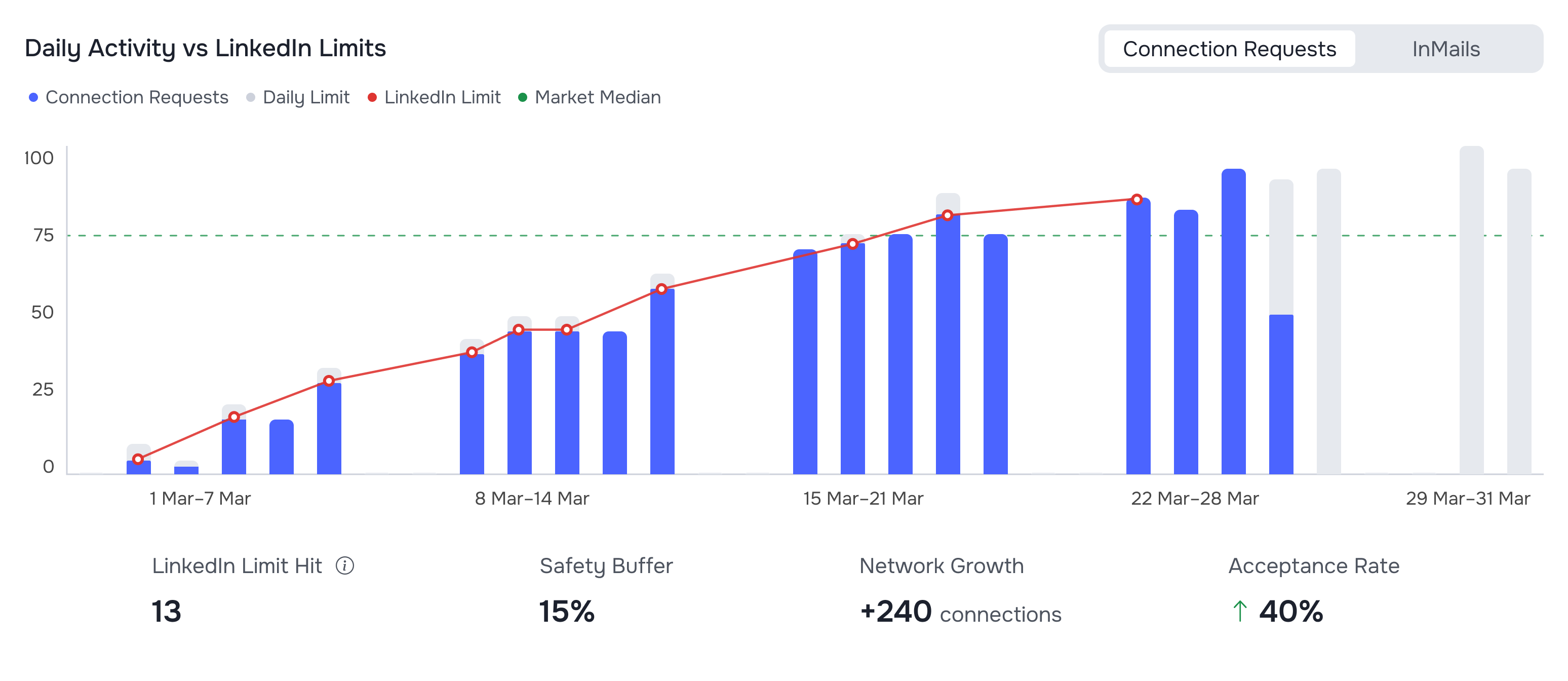
A capped account in GetSales. Grey is the daily allowance, blue is what actually went out, red is where LinkedIn's own limit sat that day, green is the market median. This account banged into the ceiling 13 times in a month, which is exactly the pattern you want to stop.
The real benchmarks: 6M invites, last 3 months
Every guide online repeats the same LinkedIn weekly invitation limit: 100. This is the part nobody else has. We analyzed 6 million LinkedIn invitations across the platform. Here is where the market actually stands, so you can grade yourself:
A couple of things worth sitting with:
- ~21% acceptance is universal. There is no secret accept-rate penalty for smaller senders: low and high performers both land around 20%.
- Paid accounts send about 40% more. Premium and Sales Navigator come out almost equal (Premium edged it by ~2%, basically noise). For a long time we told people Premium had no impact on volume; the data proved us wrong. If you want more reach, Premium pays for itself.
- The top tier is real. Vetted, well-built accounts comfortably sit around 400 a month (the top ~25%), and the very top cohort runs 1,000, some even combining automated and manual to go beyond that.
350-450 a month? You are in solid shape for 2026. Around 200-300? You are at the market median: fine, but push higher. Under 150? Something is off, and your account likely has a trust or limit problem worth fixing.
LinkedIn account warm-up is the mechanism behind all of this: volume grows only as fast as the account earns trust. You do not have to do the arithmetic by hand either. GetSales plots your own account against the same benchmark set, and tells you which rung of the warmup ladder you are actually on:
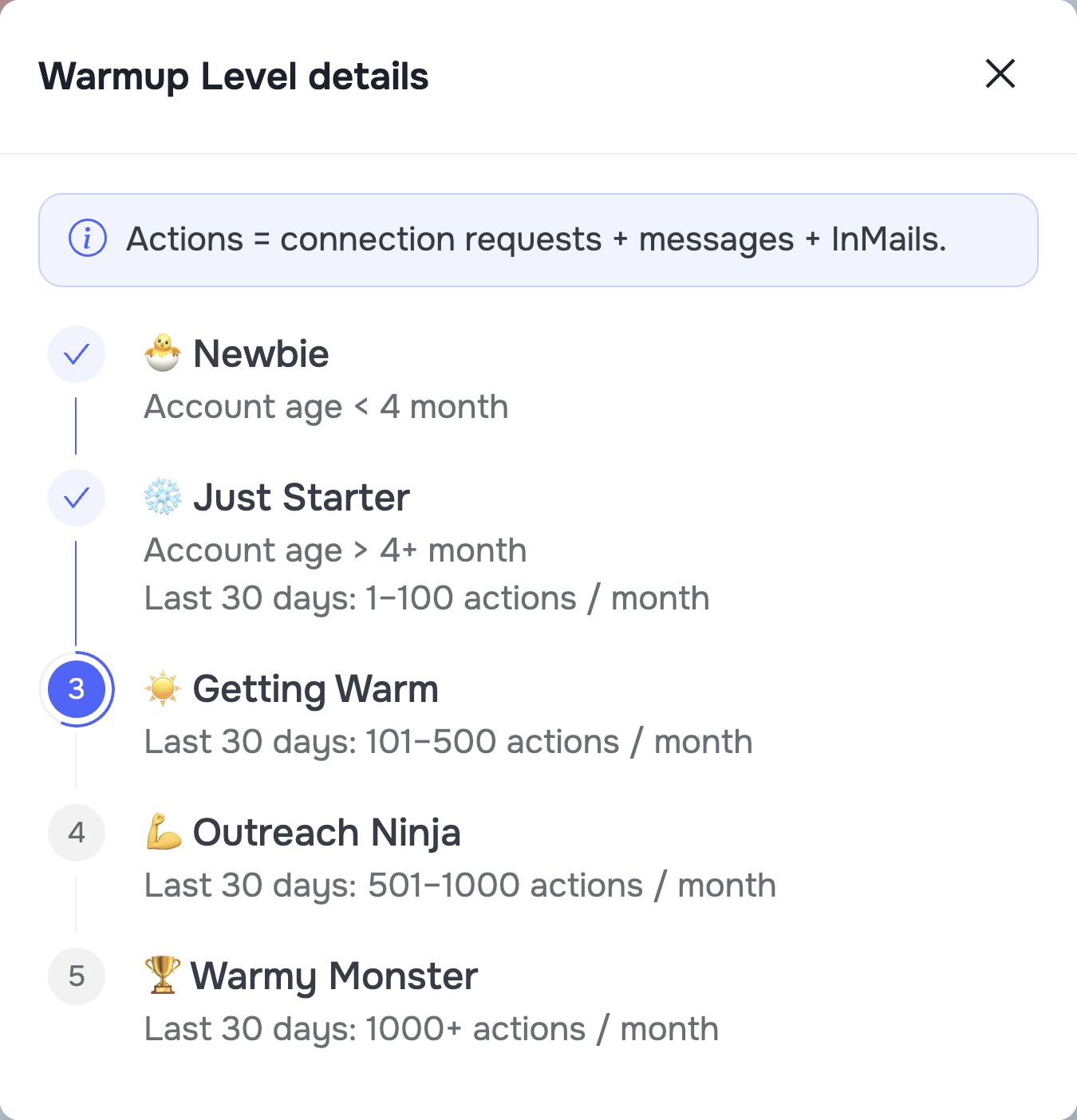
The warmup ladder in GetSales. Actions means connection requests plus messages plus InMails. The 1,000-a-month top cohort from the benchmarks is the top rung here, and you climb it, you do not jump to it.
Four myths that waste your time
We tested the popular theories so you do not have to. All four are wrong:
- "It's my proxy." 5G, residential, datacenter: we checked them all. Proxy type does not change how many connections you can send. Accounts on different proxies hit the same cap. Proxies matter for safety and fingerprint, just not for volume.
- "Manual sending bypasses it." We pulled capped accounts out of automation and sent fully by hand from warm accounts. Still capped. It is not an automation cap, it is an account cap.
- "Some tool sends more than others." Every automation tool is affected equally. No tool has a magic lever; they are all subject to the same LinkedIn limits.
- "Rented accounts are treated differently." Rented or your own, it does not matter. The cap does not care who owns the account.
The one popular belief that did survive the data is Premium. Paid accounts really do send about 40% more, and the Premium versus Sales Navigator gap is noise:
What hitting the cap actually costs you
This is the most important finding in the whole report. We asked a simple question: is it harmful to bang against your weekly limit every day, or is it harmless?
The data is clear. When you hit the weekly limit, you double your chance of getting logged out. And "logged out" is a bucket: it can mean a simple re-login, a LinkedIn warning notification, or a full ban. Most are mild. But do it repeatedly and the logouts snowball into something worse.
Do not live at your limit. If you want fewer logouts, fewer flags, and to stay under LinkedIn's radar, you need to send below the cap, consistently, with randomization. That is exactly what Smart Limits is for.
So the metric to watch is not how much you sent. It is how many times you touched the ceiling, and whether that number is trending to zero:
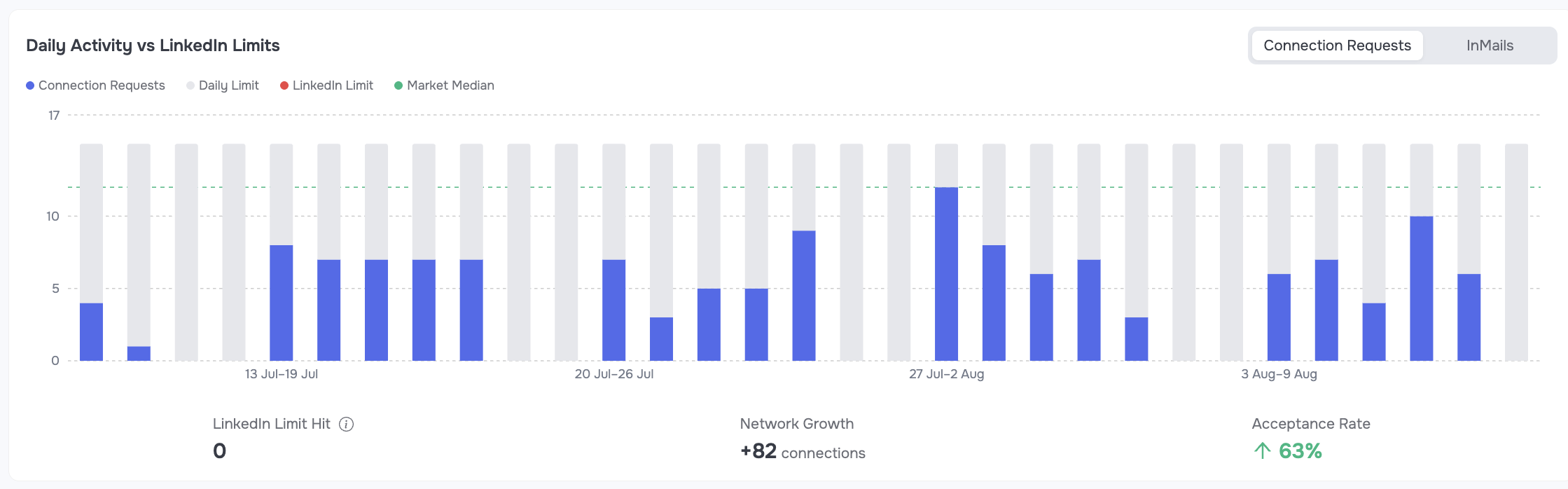
The same chart on a healthy account: sends sit under the grey allowance every day, limit hits are at zero, and the network still grows by 82 connections with 63% acceptance. Sending less at the ceiling is what buys you more over the month.
One account you can watch by eye. Twenty you cannot. If you run an agency, or any team with more than a couple of profiles, that same number has to be visible for every sender at once, in one table:
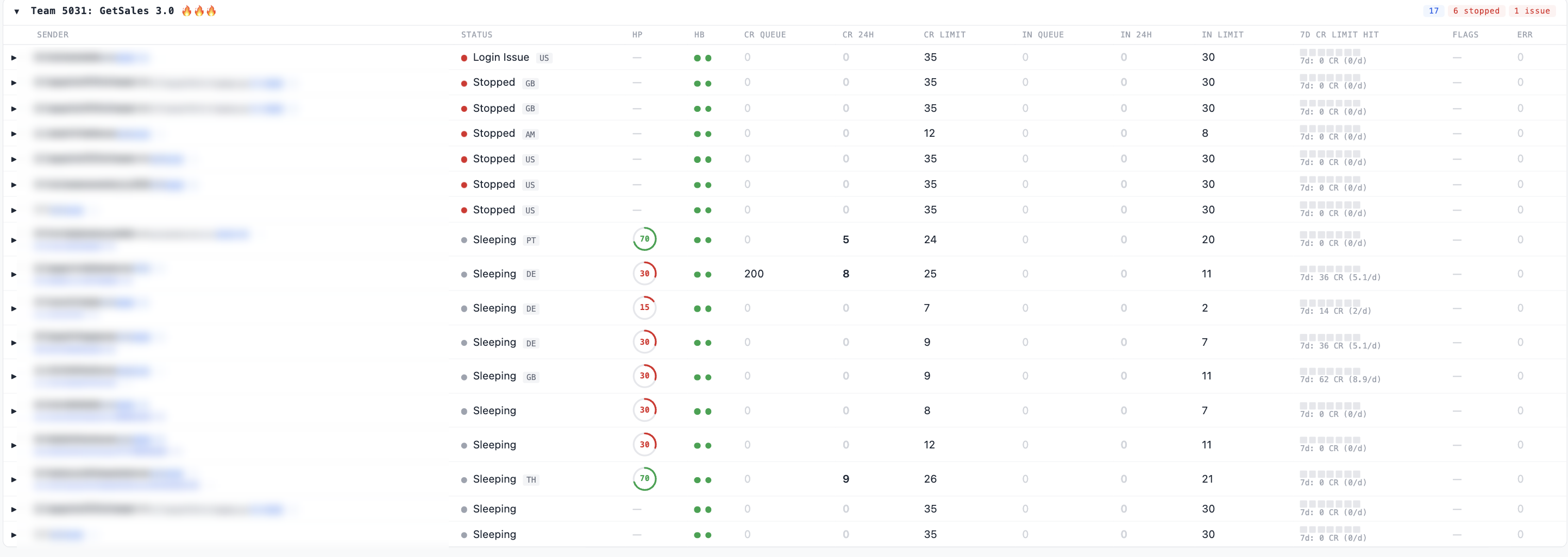
The GetSales agency dashboard: every sender profile across every team on one screen, with its health score, its current connection-request limit, and a 7-day strip marking the days it banged into the cap. One glance tells you which accounts are stopped, which are sleeping and which are pushing the ceiling. Client names are redacted here.
How to safely send more: the blueprint
Not hacks. Actual blueprints, straight from the data and from running outreach at scale. Imagine you are capped. Here is what actually lifts it, in order.
1 · Make your profile and targeting relevant
A complete profile is not enough anymore, it has to be relevant. LinkedIn's AI reads how well your headline, bio and messages match the people you are reaching. Send from US accounts to US prospects, EU to EU. Right account, right people, right offer that actually fits them.
You can score this instead of guessing. GetSales breaks account health into six signals and tells you which one is dragging you down:
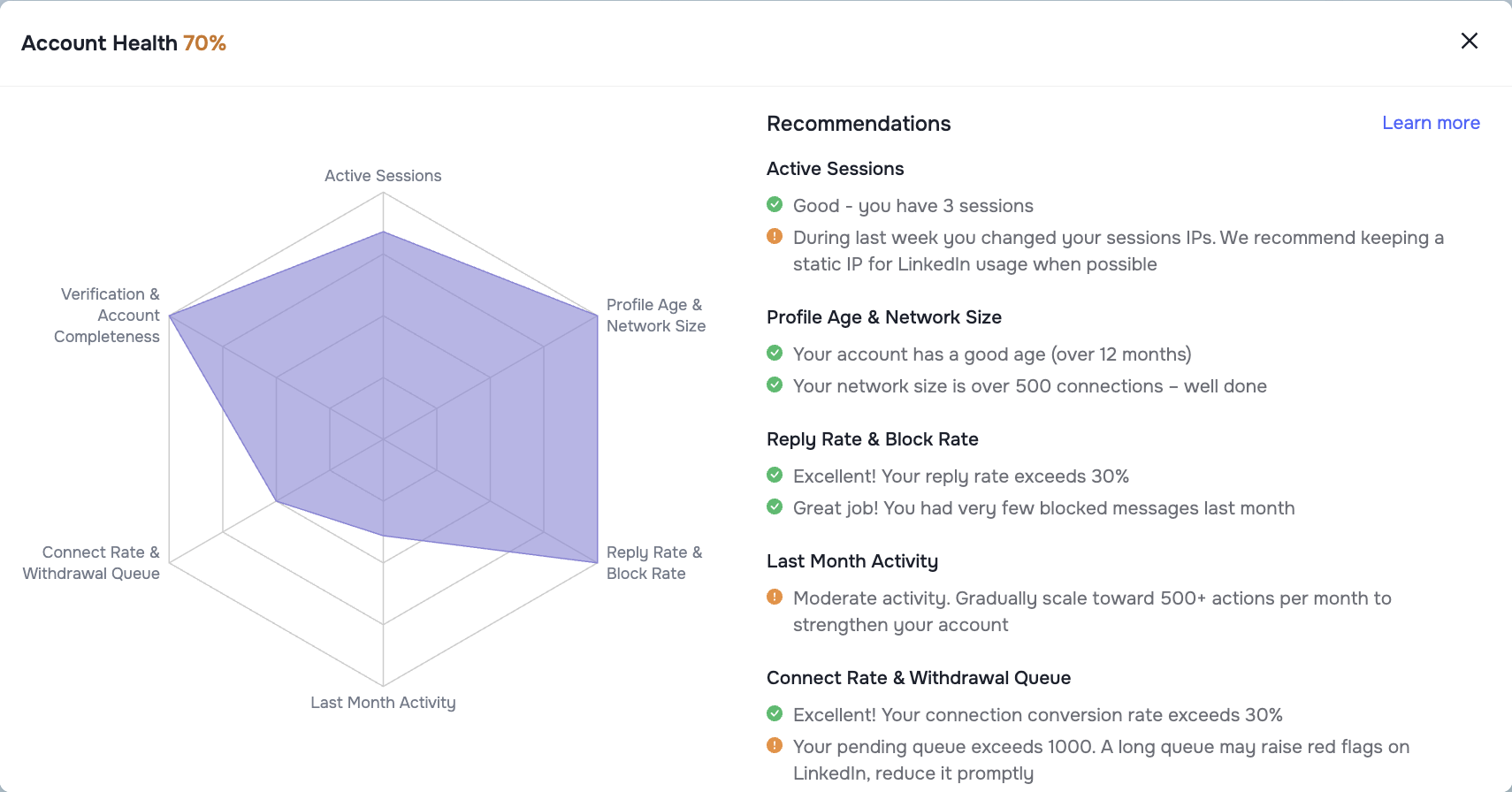
Account health in GetSales, with a recommendation attached to every signal: active sessions, profile age and network size, reply and block rate, last month activity, connect rate and withdrawal queue, verification and profile completeness.
2 · Fix your network shape
Relevance lives in your network too. Accounts with 500-1,000 close, on-target connections beat bloated 3,000-5,000 accounts, because more of your targets sit in the 2nd degree. Clean out the irrelevant connections: they kill your engagement signal. The same health panel flags this directly, and it also flags the queue nobody thinks about: a pending withdrawal queue over 1,000 is itself a red flag on your account.
3 · Spin your offers, do not template them
"Hey {first_name}" with one static pitch is over. Run 3-5 semantically different offers, each heavily spin-texted. LinkedIn's AI reads every message, and variety keeps you off the spam radar.
4 · Watch who blocks you
Track blocked activity. Too many follow-ups and the blocks pile up, and next week you are shadowbanned. A block or two is an early warning to fix your copy or targeting before it escalates. GetSales CRM tracks this for you: filter activities by "message blocked" and you see every block the moment it happens. Remember what LinkedIn now puts under a salesy first message:
One click, no notification to you. This is why block rate is a leading indicator and your reply rate is a lagging one.
5 · Go Premium, it is worth about 40%
The data is unambiguous: paid accounts send about 40% more. Premium or Sales Navigator, your call, they are nearly equal. Just buy your license from a vetted partner, not a random reseller, or LinkedIn's geo mismatch can flag you.
6 · As a crisis move, switch country
Capped account that will not recover? You can switch its country to an unaffected market such as Argentina, Brazil or Romania. It is allowed, it is not against the rules, and it can lift the limit completely. Two things to know before you do it:
- You can only change country on an account that is not ID-verified. On a verified account the change drops your verification.
- There is a small chance the switch triggers a verification request, and to pass it you will need real documents. Rare, but possible.
If it goes through, it can both remove the cap and unlock cheaper local Premium or Sales Navigator pricing. One tip: do not buy Navigator right after switching, wait a couple of days first.
7 · Run Smart Limits
This is the spine of the whole thing. Smart Limits is dynamic: the moment an account approaches its cap it eases the daily volume down, then lifts it back up as the window reopens, always squeezing the most out of the safe zone, with volume and delays randomized. You send the maximum you safely can, instead of living at the limit and risking logouts.
One more lever worth naming, because it is the cheapest of all: stop wasting connects on dead accounts. Every invite that lands on an abandoned profile is a slot you paid for out of a shrinking cap. Fresh, verified data is how you stop that, and we wrote the whole method up separately in How to enrich 20,000+ leads for free.
If you got shadowbanned or restricted: how to recover
A shadowban is a protective mechanism, not a verdict. Give it room and it lifts. The sequence that works:
- Fully pause the campaign. Stop the sending profile, do not disconnect it, and give the account real rest.
- Do manual, non-outreach activity. Open the account in a cloud browser and comment or post on relevant content. It signals "real human" to LinkedIn.
- Revise the strategy. Check blocked users, rethink copy and cadence: the shadowban is a signal something is off.
- Restart small with Smart Limits on. After a week or two, ramp gently. Drop back a rung on the warmup ladder and climb it again rather than jumping straight back to your old volume.
Why the safety layer decides your ceiling
Everything above assumes the account survives. That assumption is the one people get wrong, and it is why Fred was on this webinar: MirrorProfiles runs 10,000+ LinkedIn accounts across every major automation tool and benchmarks ban rates on all of them.
Fred at MirrorProfiles benchmarks ban rates across the whole market. GetSales comes out lowest, clearly thanks to the built-in anti-detect architecture, and likely the automation tech on top. A capped account you can recover is a problem. A banned account is a write-off.
The practical read for you: the volume ceiling and the ban risk are the same problem seen from two ends. Pushing volume on a fragile session buys you a week and costs you the account. Fixing the session first is what makes the volume advice above safe to follow.
Your 2026 limits checklist
Score your own fleet. Every unchecked box is either volume you are not sending or a logout you are queuing up:
- You know which of the 3 groups each account is in: untouched, capped, or shadowbanned.
- You know your own monthly number against the 223 median and the 350-450 target, per account.
- Limit hits tracked and trending to zero. Not sends, hits. Living at the ceiling doubles your logout risk.
- Smart Limits on, fixed daily caps off, delays randomized.
- Account health checked: session IP stable, network on-target, withdrawal queue under control.
- 3-5 semantically different offers, each spin-texted. No single static pitch.
- Block rate watched weekly. It moves before the shadowban does.
- Premium or Sales Navigator on the accounts that matter: about 40% more volume, bought from a vetted partner.
- Dead-lead filter on your imports so a shrinking cap is never spent on abandoned profiles.
- Country switch understood as a crisis lever, not a growth tactic, and only on non-verified accounts.
All of this runs in GetSales
Everything above is built into one platform, trusted by leading agencies and GTM engineers for the lowest ban rates on the market.
Smart Limits
Reacts to each account's cap in real time: eases volume down the moment you near the limit, lifts it back as the window reopens. Randomized, dynamic, always sending the safe maximum.
Account health and limit log
See exactly when each profile hit a limit, its health score across six signals, and what needs attention. Real data instead of guessing.
Auto-warmup
The warmup ladder raises your target volume as the account earns it, so scaling never turns into a spike LinkedIn punishes.
Agency dashboard
Every sender profile across every team in one place: healthy, stuck and at-risk accounts at a glance. Built for scale.
Anti-detect, single session
Embedded anti-detect browser and single-session protection keep every LinkedIn account separate, clean and undetectable.
Free and real-time enrichment
Every imported lead enriched, with the enrichment date on the record, so a shrinking cap never gets spent on a dead profile.

The agency dashboard: how many senders are healthy, stopped or sleeping right now, then every profile's status, connection-request limit and 7-day limit hits underneath. Ask GetSales support for access, it is free for customers. Real sender names are blurred here.
FAQ: LinkedIn connection request limits in 2026
How many connection requests can I send on LinkedIn per week in 2026?
There is no single number anymore. Across 6 million invites the median account sends about 223 invites a month, healthy accounts sit around 400, and the top cohort runs 1,000. The famous "100 a week" is a display cap, not your account's real ceiling.
How many connection requests per day is safe?
On a warmed account, 20-30 a day spread unevenly like a human is a safe zone. The daily count matters less than your rolling total and your acceptance rate.
Why does LinkedIn say "You've reached the weekly invitation limit"?
You hit your account's individual cap. Pushing through it with retries is what doubles your logout risk - the safer move is to fix the account signals that set the cap, covered in the blueprint above.
Does Sales Navigator or Premium raise my connection limit?
Not by itself. Premium accounts in our data do send more, but the lift comes from account health and trust signals, not from the subscription tier.
How do I know if my LinkedIn account is shadowbanned?
Invites stop going out beyond a trickle and LinkedIn never notifies you. Watch your own send curve: an account that sends under 20 connections and then goes silent for the week is in the shadowbanned state.
How do I recover a shadowbanned or restricted LinkedIn account?
Stop automation, run human-only activity for a week or two, then restart small and climb the warmup ladder again. The step-by-step sequence is in the recovery section above.
How long does LinkedIn account warm-up take?
Weeks, not days. Volume should grow only as fast as acceptance rate allows - jumping straight to top-cohort volume is what triggers caps and logouts.
Can I send more by running multiple LinkedIn accounts?
Yes - per-account limits multiply across sender seats, and that is the only real ceiling-lift. It works only while each account keeps its own health profile intact.