

Why you're paying for LinkedIn lead enrichment you can get for free
Most people run the same play: pull a list, then pay Clay or Apollo to enrich it on top of whatever tool they already use for sending. The thing is, the sending platform usually already enriches those leads. You're paying twice.
And here's the deeper problem with the paid route: almost everyone resells the same shallow, scraped data, and scrapers can't reach the deep fields anyway. It is also static: you get a database export, not real-time enrichment - and the difference is whether the email you send to still exists. So you either pay for the shallow stuff everyone already has, or you simply can't get depth at all.
GetSales is the obvious example of the other way. It's a multichannel outbound platform with the safest sending infra around, and enrichment is built right in:
The lead enrichment workflow, step by step
This is the exact path, start to finish - screenshots from the real product.
Sign up
Create your account at amazing.getsales.io/signup. You get a 7-day trial right away.
Create an automation
Open Automations and choose Build manually.
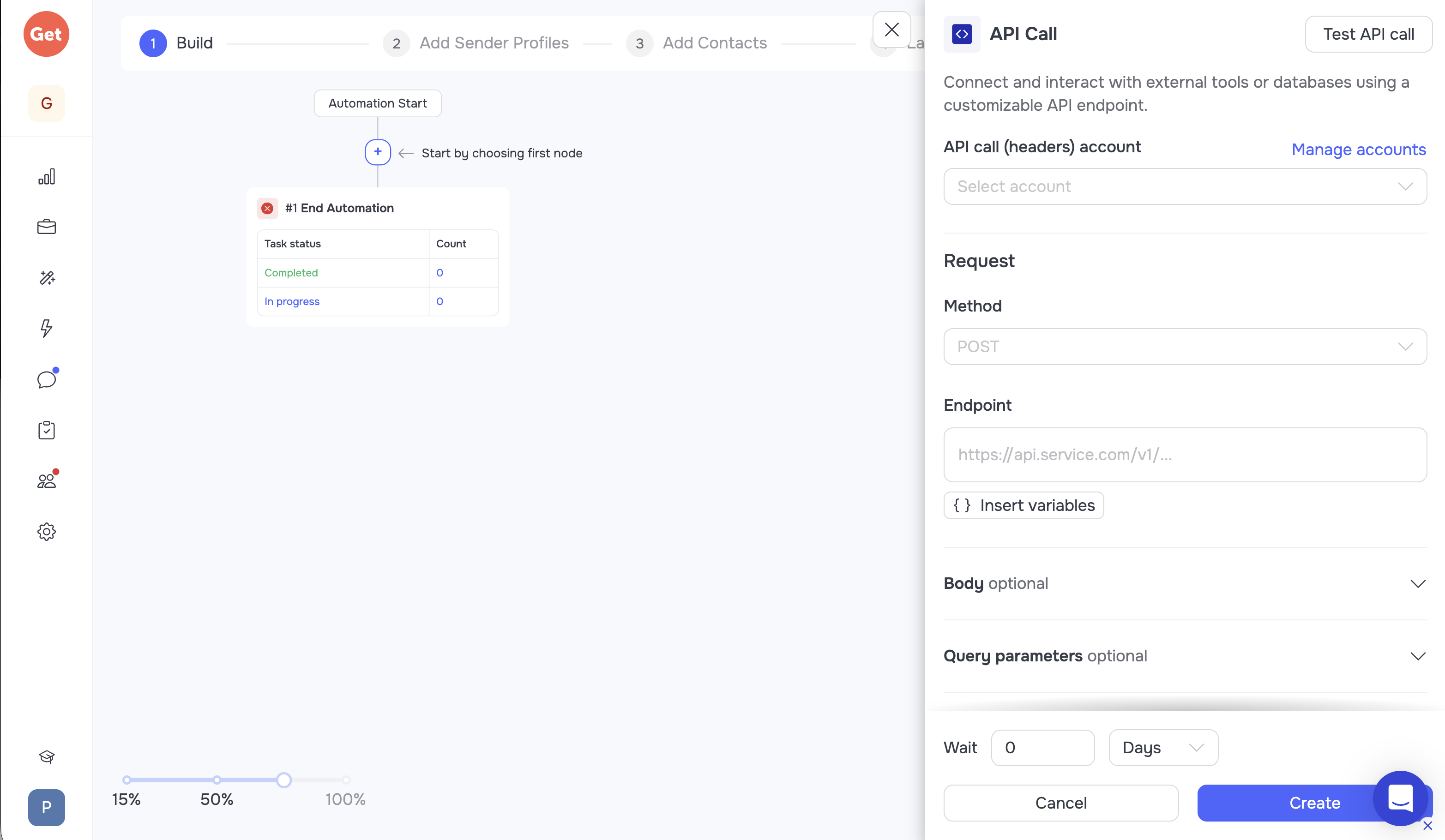
Add a single node
You only need one node - it decides how the enriched data leaves GetSales. Pick whichever fits:
- API call node - after enrichment GetSales sends each lead's info out; configure exactly which fields you want back (and optionally add an API token to reuse it).
- Custom export webhook - create a contact-export webhook and grab the URL from n8n or Make.
- Add tag - the simplest. The lead gets a tag once enriched, so you find it by tag in your CRM, or pull tagged contacts via the API / MCP.
Choose a sender
Next builder step: pick a sender. You don't even need to connect your own profile - click Create sender, then just interrupt the connection. The sender still shows up in the list, ready to select.
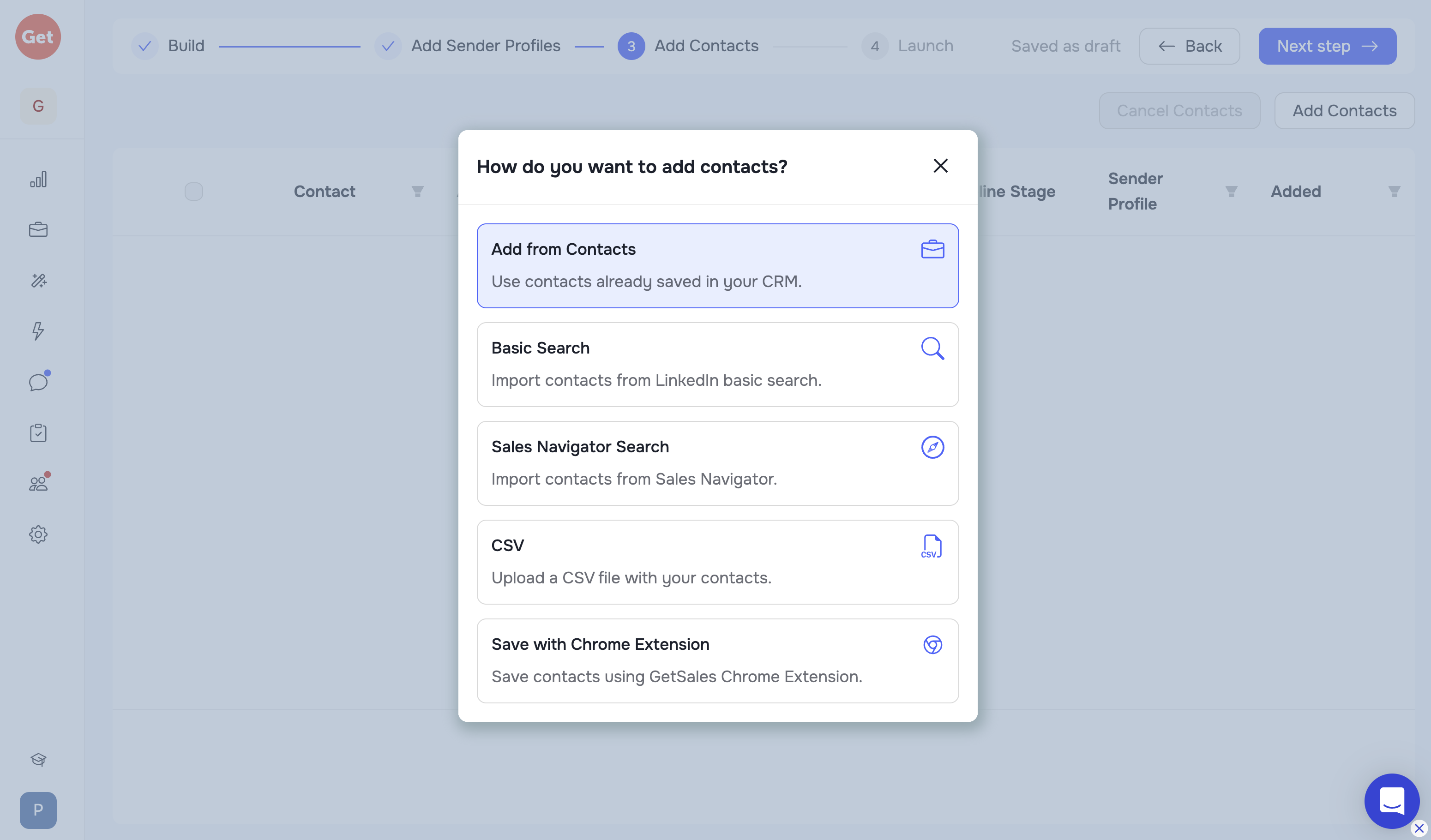
Import your leads
Import a CSV, a Basic search link, or a Sales Navigator link. (You can add more leads later with the other methods in the Import section.)
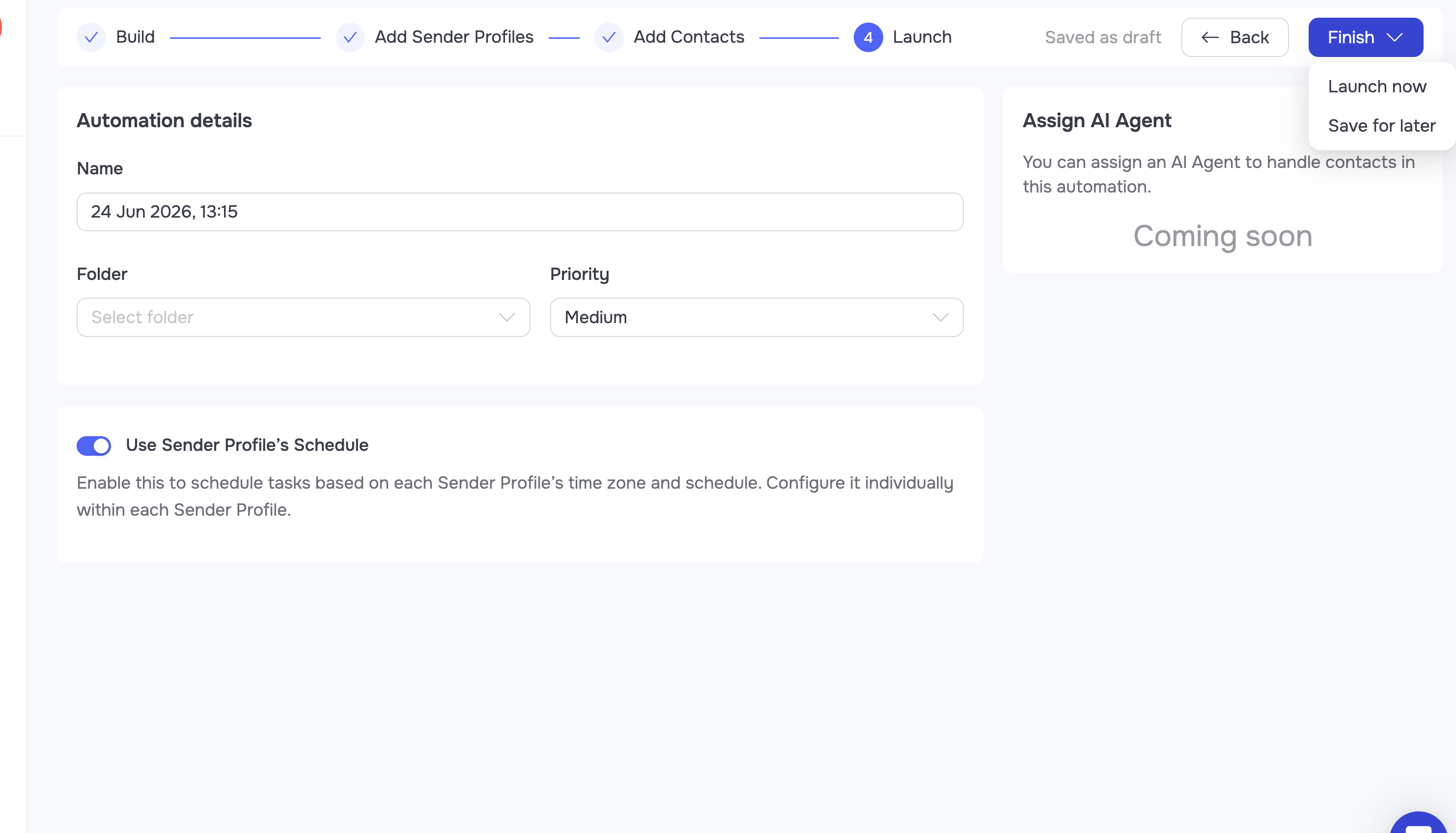
Save & launch
Hit Save and launch. The build is done.
Watch it fill up
Your automation goes live and contacts start flowing in as they're processed. Some pass straight through and fire your webhook; the rest queue for enrichment.
Usually 30-50% of contacts get a fresh enrichment (the process takes 2 hours to 2 days). On those you get fully fresh data: headline, current job, company, last 3 posts, language, follower count, lead description - everything visible on the profile page. The rest aren't fresh (a week, a month, three months old), but the basic fields you usually need are there, and it's all basically free. Most tools charge you for data they buy from Bright Data, refresh it once a month, and hand it over incomplete. Here it's free, more complete, and real-time.
Check the data freshness
Every record carries a last enriched at date alongside the data - so you can tell at a glance whether the older info is still good enough to use. B2B contact data decays 2-3% a month, so a database that was correct in January is meaningfully wrong by summer.
Re-enrich on demand
Not fresh enough? Re-enrich from another source - or, if you're on the Enrich plan, fire an extra enrichment right before the webhook and refresh everything older than 7, 30 or 90 days.
The pricing trick: enrichment credits, not per-record fees
Enrichment is included in the Enrich plan - which already gives you the best price on the market for LinkedIn automation, plus a pile of enrich credits thrown in. If you're already sending outreach, it's the obvious pick: same price range, fresh enrichment tokens basically for free.
You can request re-enriches on demand straight through the API or MCP - so your own stack, or your AI BDR, can pull fresh data on any lead, any time.
The 7-day trial already comes loaded for free: 100 enrich credits, 50 email-search, 10,000 LLM credits, and unlimited activities. Apply the coupon and you've got two ways to go:
The 5-seat Enrich plan is $245. The $200 coupon brings it to just $45 - and you get 2,500 enrich credits, a 37-day trial, all 5 seats, and every feature.
The 2-seat Enrich plan is $198 - the $200 coupon covers it in full, so it's free, with 1,000 enrich credits, for 37 days.
FAQ: free lead enrichment
What is lead enrichment?
For LinkedIn leads it means turning a bare profile URL into the full live picture: verified work email, current companies and title, headline and about, plus up to the 20 most recent posts. That depth is what lets you actually target and personalize outreach, not just fill a spreadsheet.
Can you really enrich leads for free?
Yes. The flow above runs on the enrich credits included in GetSales, so 20,000+ leads get enriched without a data-vendor contract or a second tool.
How do I get someone's email from their LinkedIn profile?
LinkedIn hides emails from non-connections, so enrichment resolves the profile against live sources and returns a verified work email. In GetSales it is one node in an automation.
What is the difference between real-time enrichment and a static database?
A static database was accurate the day it was scraped and decays 2-3% a month. Real-time enrichment queries at the moment you ask, so you get today's title and today's company.
What is waterfall enrichment, and do I need it?
Waterfall enrichment chains several providers to raise coverage. It mostly fixes a coverage problem you inherit from stale single-source data - starting from live LinkedIn-sourced records removes most of the need.
How much does lead enrichment normally cost?
Typical waterfall pricing runs $0.15-0.40 per record. That per-record meter is exactly what the credits-based flow above avoids.
How do I know if my enriched data is fresh?
Every record carries a last-enriched-at timestamp, and you can re-enrich on demand instead of re-buying the list.