


What's inside
- Messages that get replies (hacks 1-8)Peter
- Leads that accept your connection (hacks 9-11)Peter
- Channels and senders that get through (hacks 12-14)Peter
- Your network and your profile (hacks 15-19)Peter
- Nurturing before outreach (hacks 20-25)Oleg
- Nurturing after outreach (hacks 26-32)Oleg
- Your acceptance and reply checklistBoth
First, know where you stand: what a good LinkedIn acceptance rate looks like
Every hack below is worth exactly as much as the gap it closes. So start with the market. These are GetSales network benchmarks for Q2 2026: 6M+ connection invites sent across 20k+ accounts, anonymised.
The top 10% roughly double the median. Nothing about them is magic: they run the hacks on this page and the median sender does not. If you are above 21% accept you are in decent company. If you are meaningfully below it, something on this list is broken in your setup.
One honest caveat from the webinar: in saturated niches like custom software development, accept rates sit lower no matter what you do. Read your own number against your niche, not against the best case.
Messages that get replies
Eight hacks about the thing everyone blames last: the message itself. "My offer doesn't work, what do I do?" is the most common question Peter gets, and the answer is almost never "send more".
Build a no-brainer offer
A vague offer dies on LinkedIn no matter how good your team is. "We offer LinkedIn automation at a good price" has nothing to grab. A no-brainer offer is so concrete that saying no takes effort.
"We offer LinkedIn automation at a good price. We have been doing this for years and our team is very experienced."
"Unlimited LinkedIn and email automation, flat fee, $79."
"Rental LinkedIn accounts, $10 a month."
"Automation that dodges the daily caps: 1,000 connections a month."
Peter's own case: one email to 2,000 people on an unlimited LinkedIn plus email offer, reaching the audiences of Smartlead and Instantly, produced 40 booked meetings in the same week. No personalisation, no icebreakers. The offer did all of it.
Hunting for that offer is the work. It has to be genuinely good for them, not just cheap for you.
Lead with value, not a pitch
The alternative to a hard offer is a give. Open with something useful and ask permission to send it. The prospect gets a one-word decision instead of a buying decision.
- "I put together a guide on how to double your LinkedIn acceptance rate. Want me to share it?"
- "We ran an audit of your AI presence, how often GPT and Claude surface your brand versus competitors. Want to see it?"
- "A client is looking for domain experts, some of ours make $10k a month on the side. Want an invite?"
Then, once they say yes and you deliver, you get to ask the real question: "what is your acceptance rate right now, and how actively are you running outreach?" The conversation is already open, so you can see where they stand against the market.
Send follow-ups, and stop at three
Most of the 22% median reply rate is not in the first message. Here is how replies actually decay across a sequence, per message, on GetSales network data:
Read these as conditional rates: each is the reply rate among the leads who actually reached that message. They do not add up to the 22% average, they compound into it.
So one message is leaving most of your pipeline on the table, and message four is nearly free of value. Three follow-ups on a cold sequence is the current sweet spot. Push to five or six and you start collecting blocks: Peter had a co-founder's account restricted for harassment years ago on an eight-touch sequence. Anything more than that belongs in nurturing, not in the campaign.
Do not send links before the first reply
A link in a cold DM does not get clicked, it gets you flagged. LinkedIn surfaces a "this message contains a link that may be harmful" warning to the recipient, and links push you toward the spam filters.
Same answer for video. Sending a Loom in the first DM is a bad idea twice over: it trips the link warning, and personalised video at scale burns hours for a rounding error. The move that works is to offer the video: "want me to put together a short video for your setup?" Record it only for the people who say yes. If you need a booking route, point at the booking link in the conversation header rather than pasting a URL.
Worth knowing: rental account providers like MirrorProfiles do not allow links before the lead's first reply either. This is an infrastructure rule, not a preference.
Do not look automated
The self-check before every send: could this exact message go to another person, and another one after that? If yes, the recipient will feel it. They get hundreds of these and they recognise the pattern instantly.
Three things that give you away:
- Raw placeholders. "Hey {firstname}, came across your profile and saw you work at {companyname} as {jobtitle}" reads as a mail merge, because it is one.
- Uncleaned variables. "You CEO and founder and champion of the world at Coca-Cola LLC" is what happens when you pipe LinkedIn fields straight into a template.
- Back-to-back actions. Visit, like three recent posts, endorse a skill, connect, message the second they accept. Nobody does that by hand. Simplify: the connection request is enough, and then wait.
The fix for the variables is AI variables: a prompt that normalises a messy name, title or company on the fly, with a fallback when the data is missing.
The fix for the timing is patience. Never message the instant someone accepts. Either wait one to three days, or send a plain "thanks for connecting, John" and then come back later with the actual reason.
Use AI icebreakers, but keep them short and real
AI icebreakers help, and they also produce some of the worst messages on LinkedIn. The difference is which data point you build on.
A good one, generated in GetSales from a recent post:
"Thanks for connecting, Peter. Looks like a really practical session, hacks tied back to real benchmarks, sounds worth catching live. Are you planning to share a replay afterwards?"
Nothing clever about it. It is timely, it is true, and it does not feel processed.
"Thanks for connecting, Peter. Going from professional tennis to closing six-figure deals is quite a journey. What was the biggest skill that carried over from the court to sales?"
Peter's verdict on his own generated example: he does not like it. Five years ago, hand-written, it landed. Today the market is saturated with exactly this shape, so it reads as a bot performing enthusiasm. Shorter is safer, and the data point you pick matters more than the prompt.
Two waterfalls in GetSales: headline plus About, and the prospect's most recent post.
Spin every message, and watch your open rates
A/B testing is not only for finding the winning offer. Run it continuously, because the same message sent at volume decays on its own: the audience gets tired of it, and LinkedIn reads your messages and notices that thousands of identical texts are leaving one account.
Minimum viable hygiene: two or three offer variations in rotation, plus spintax inside each one.
Then watch the metric almost nobody watches on LinkedIn: open rate. When opens drop, your messages have started landing in the "other" inbox. Everything looks healthy from your side, connections keep going out, sends keep succeeding, and the conversations simply stop arriving.
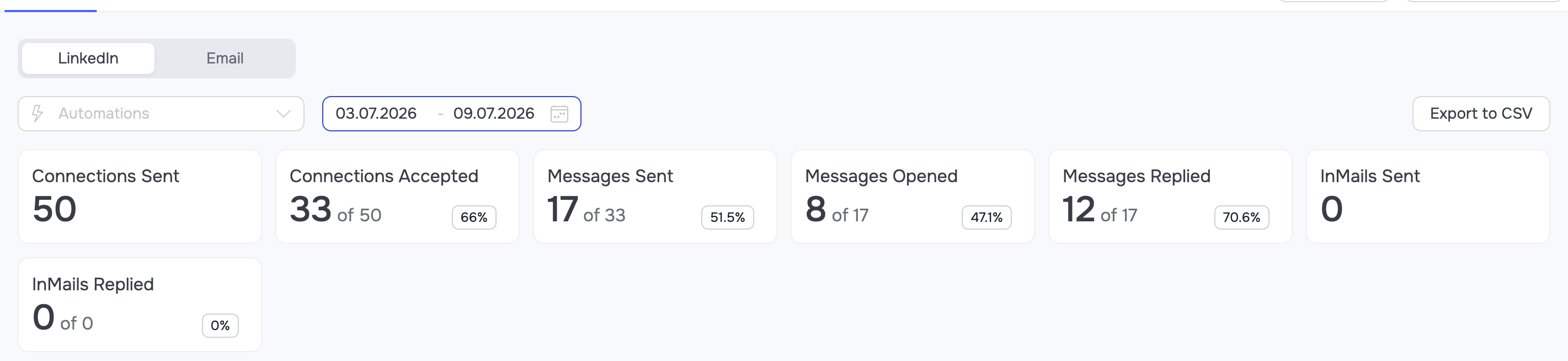
Open rate tracking in GetSales. A sustained drop is the early warning that your sender is being filtered.
Speak their language
Outreach in the lead's native language converts better than English. That is not new, and most teams still send English into Germany, France, Italy and the Netherlands because splitting the sequence feels like work.
It is one filter. GetSales enrichment returns the profile's primary language and the languages it supports, so you can either generate the message in that language or bucket leads into per-language sequences.
The lead already carries the language. Greet them in it: "Hoi Karel, alles goed?"
If a full native sequence is too much, play with the greeting only: open in their language, continue in English. And if someone asks how your rep speaks Italian, list a couple of languages at elementary level on the profile, or just make a joke about it.
Leads that accept your connection
When Peter audits a campaign sitting at a 2% acceptance rate, the message is almost never the reason. The list is.
Clean the list before you send anything
A real audit from the webinar: a customer wanted plumbers and local businesses. In his list Peter recognised the CEO of a tech company, a GetSales customer. Around him sat interns, developers, random job titles, several countries. A scrape from Sales Navigator or Apollo, shipped straight into a campaign.
Irrelevant leads do not just fail to convert, they cost you four ways:
- They never reply, and they burn connection capacity you no longer have to spare.
- They mark you as spam, because you are pitching them something genuinely irrelevant.
- They do reply, "sounds interesting, tell me more", and you spend a week finding out he is a janitor at the company whose CEO you wanted.
- They drag the whole account's health down with them.
What a clean list looks like: one buying persona, one geography, one offer. Same job titles. Real people with a photo, a location and a real network, not 100k-follower influencers and not the chairman of Bank of America.
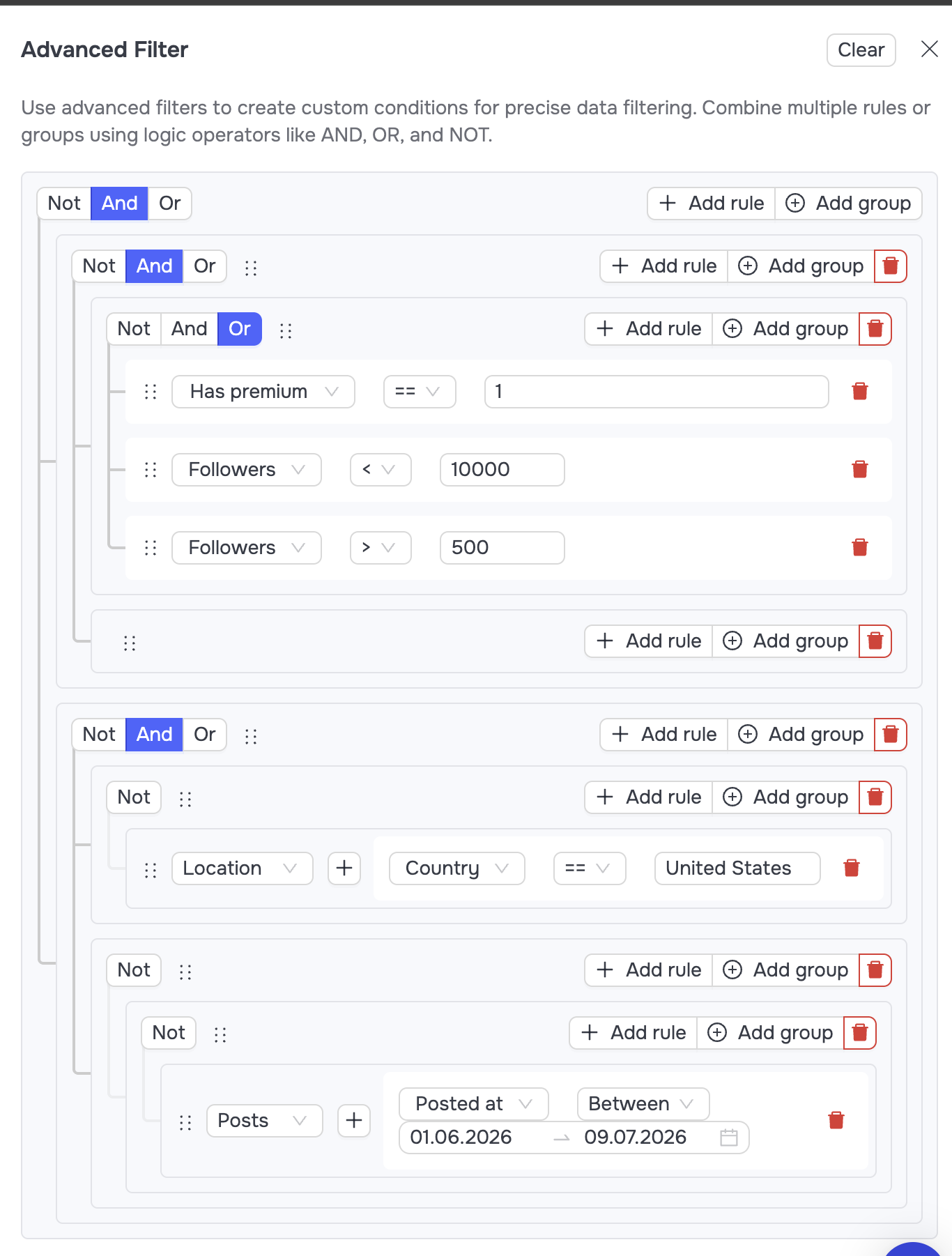
Advanced filters in GetSales: split the list into buckets before the first invite goes out.
One category deserves its own filter, because it is easy to miss and it is 5-10% of a typical list: a relevant job title at an irrelevant company. The right persona, the wrong business. On LinkedIn that is a wasted invite every time.
Enrich, then split into buckets
Databases rot. The person you pulled from Apollo left that company nine months ago, and your message about their current role reads as a mistake. Enrich before you send: confirm the company, the title, the geography, the size of their network.
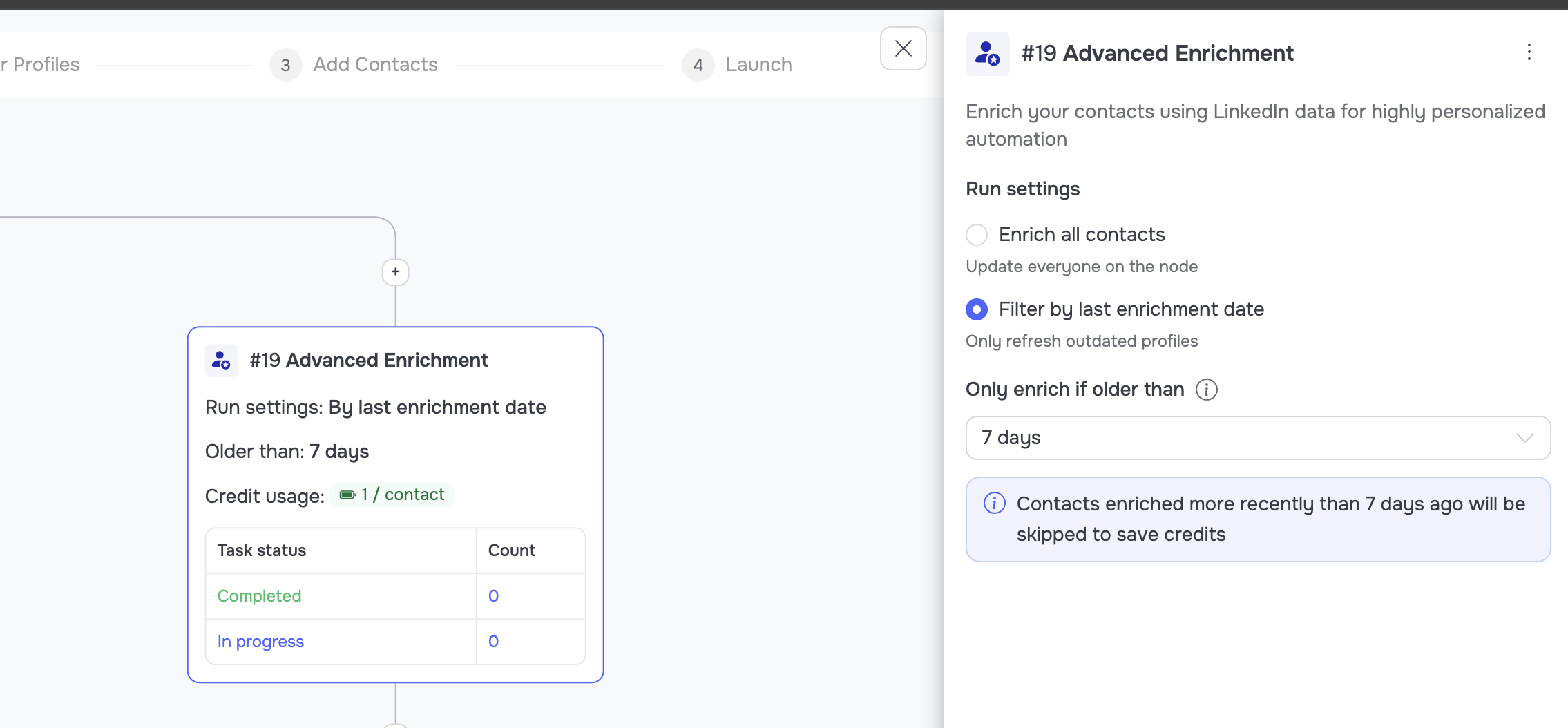
An enrich node in the automation: every lead gets refreshed on the way into the sequence.
Then split, do not blast. A practical bucketing from the webinar:
1Reach first
Has a photo, 500+ connections, premium account, right geography. The most reachable slice of your list.
2Nurture instead
Big followings, heavy content creators. They will not accept a cold invite, so warm them in the feed first.
3Fix or drop
Stale companies, missing data, no photo, tiny networks. Re-enrich, or accept they are not worth an invite.
4Wrong company
Right title, irrelevant business. Route them out before they eat capacity.
Enrichment is a whole playbook of its own. If you want the mechanics, credits and the cheap way to run it at volume: How to enrich 20,000 leads for free.
Treat signals as intent, never as a substitute for relevance
Signals are useful and badly overrated. Relevance wins every time. What a signal actually buys you is that the outreach feels less automated, and sometimes a reason for the timing.
"Saw you attended the webinar on doubling LinkedIn conversions. I put together the playbook version of it, thought it might be useful. Want me to send it over?"
"I saw you liked a post about outbound. Here's my product."
The distinction worth internalising: a signal is intent, not an attribute. "Attended a webinar" beats "uses Intercom", every time.
- Dead end: "I saw you liked X post."
- Overused: raised funding, hiring for a stack.
- Overused but still working with the right frame: followers of competitors, people engaging with your content.
- Custom and best: attended your webinar, downloaded your guide, showed up somewhere on purpose.
Channels and senders that get through
You do not have unlimited invites anymore. So the leads who never accept still have to be reachable, and the accounts doing the sending have to stay alive.
Use InMails, because almost nobody does
A paid account gets around 40% more connections on average in our data, and it unlocks a channel that sits almost empty. Open profiles can be InMailed for free. For everyone else, Sales Navigator gives you 50 paid InMails a month that most teams simply never spend.
- Enrich first, so you know who has an open profile and can be reached for free.
- InMails outperform email, and the inbox is far less crowded.
- They are only worth it behind a real offer. A wall of text wastes the slot.
Email everyone who never accepted
At a 21% median accept rate, roughly four out of five people in your campaign never open a conversation with you on LinkedIn. Most teams write them off. Find their work email instead.
The rule that makes it work is the same as hack 2: a value proposition, not a pitch. "Hey, I put together a guide on how to do X. Want me to share it?" gets replies at low volume from a primary domain.
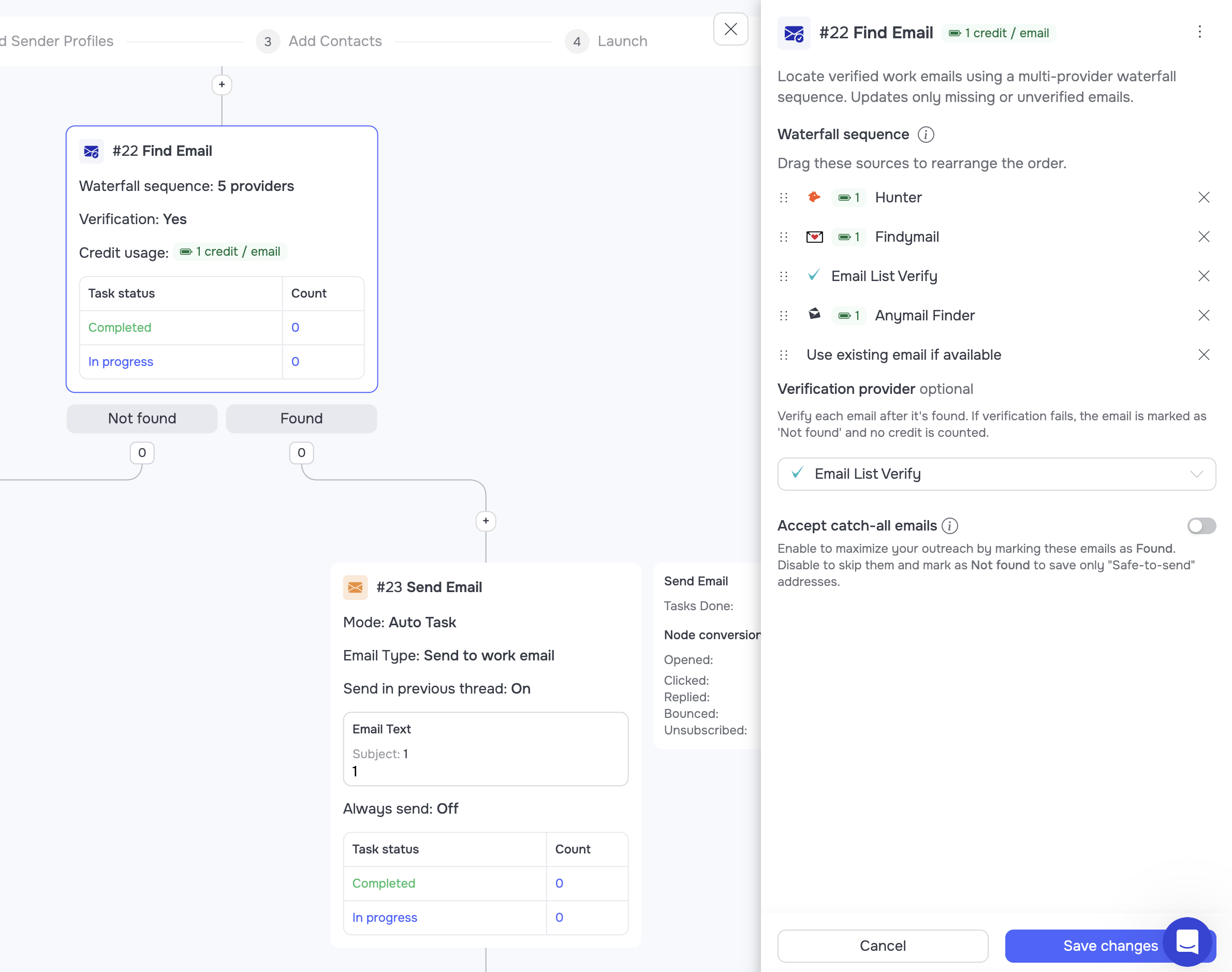
Find Email into Send Email in GetSales: a waterfall across providers, then verification, then the message.
Peter is still getting messages from people who attended the previous webinar, tried exactly this, and came back to say it works. Low scale, real value prop, replies.
Keep your senders alive
Conversion is not the only number that matters. A restricted account converts at zero, and so does an automation that quietly ran out of leads three weeks ago.
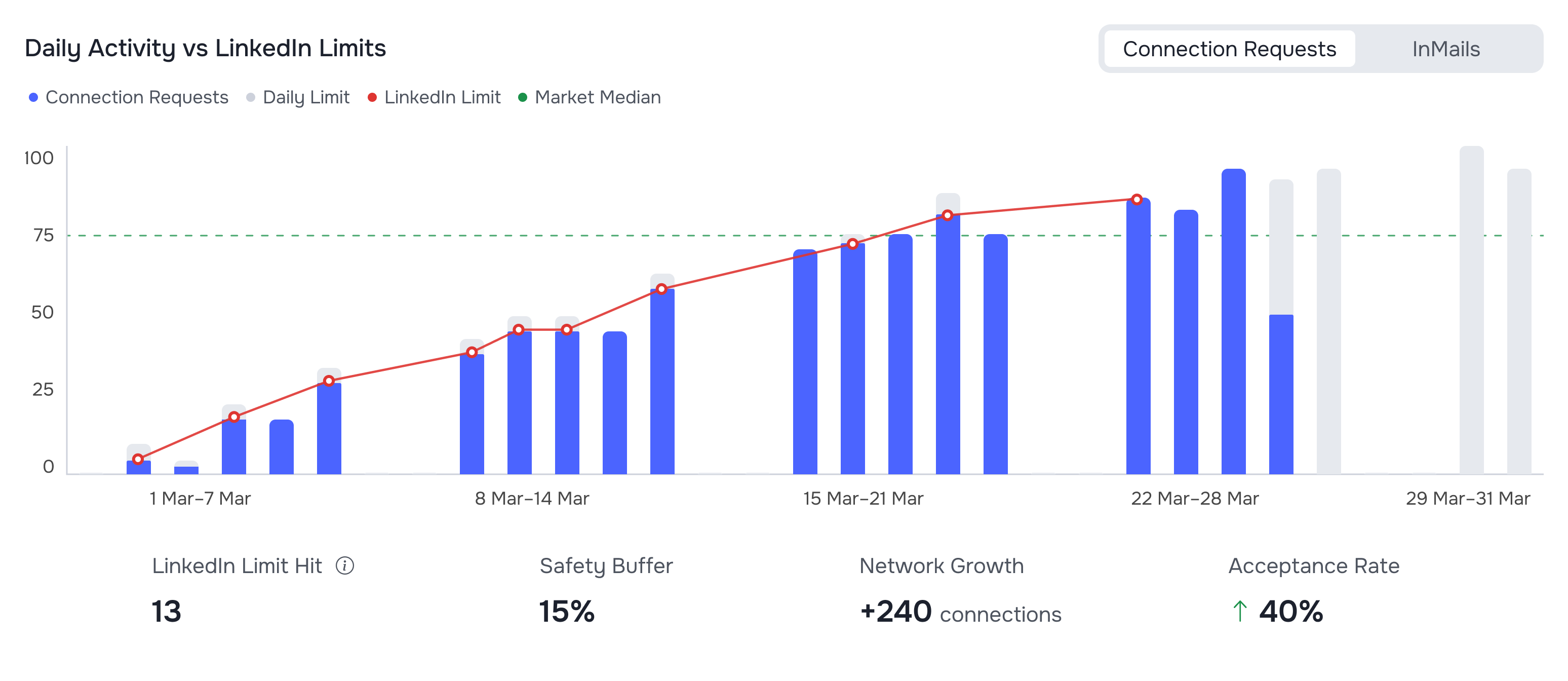
Smart Limits reads each account's own moving cap and holds the safe maximum. The agency dashboard shows tasks, limits and volume across every sender at once.
- Turn Smart Limits on. It responds to LinkedIn's per-account limits, protects the sender and handles warm-up.
- Watch for starving automations. The most common silent failure is a campaign that has been "running" for weeks with no leads in it.
Your network and your profile do half the selling
While digging through the accounts with unusually high reply rates, one pattern kept showing up: they were not sending better cold messages. They were talking to people who already knew them.
Mine your 1st-degree network
When you launch a campaign, some of the list is already connected to somebody on your team. Most tools handle this by ending the automation for those leads. That is the exact opposite of what you want: they are the warmest people in the file.
- Distribute by prior engagement. GetSales routes each lead to the sender profile that is already connected to them, so the message comes from the person who has the history.
- Filter the 1st degree and change the message. No connection request needed, just a different opener that acknowledges you already know each other.
Distribute by prior engagement, then branch the 1st degree into their own message.
That is fifteen. Seventeen to go.
Part one covered the message, the list, the channels and the profile - everything that decides whether a stranger accepts you and writes back. Part two is the other half of the engine: recycling the market you already touched, and the nurturing Oleg runs before and after outreach, hacks sixteen through thirty two.
FAQ: LinkedIn connection request acceptance rate
What is a good LinkedIn connection acceptance rate?
30-45% is the healthy band in 2026; the cross-market average sits around 26-30%. Under 20% signals a targeting or profile problem that volume will only amplify.
Does personalising the connection note actually increase acceptance?
Yes, but the size depends on what you personalise. Named-field merges move little; a specific, verifiable reference moves a lot.
Should I send connection requests with or without a message?
It depends on whether the note carries information the profile does not. Content-free notes underperform blank requests; specific ones beat both - hacks 9-11 show the pattern.
Does my own profile affect acceptance rate?
Materially. The profile is the only thing most prospects check before deciding, and it compounds with message quality rather than substituting for it.
Does engaging with a prospect's content before connecting help?
It is the single largest acceptance lever available: a relevant comment before the invite reframes it from cold to recognised. Part 2 dedicates a whole section to it.