
 Back to articles




LinkedIn automation safety guide: how to avoid bans in 2026
In our six years in the outreach market, we frequently hear a startling misconception: ‘Manual outreach is safe; automation is risky.’ However, our data reveals a profound paradox: high-value executive profiles managed manually now face restrictions at a higher rate than those utilizing powerful, LinkedIn automation safety middleware. Why? Because human inconsistency—like switching IPs while traveling or neglecting browser fingerprinting — is now the primary identity trigger that causes LinkedIn bans.
To protect your company’s most valuable assets, you must move beyond simple ‘tools’ and invest in ‘infrastructure.’ Below, we break down the cumulative triggers, define how LinkedIn detection algorithms work, and present the GetSales multi-layered approach that top GTM teams use to successfully run safe LinkedIn automation campaigns in 2026.
Linkedin security evolution in 2025-2026
LinkedIn’s security evolved beyond simple spam filtering to focus heavily on LinkedIn identity verification. While this trend began in 2022, the evolution has never ceased; the final two quarters of 2025 saw a surge in mandatory checks for brands, HR teams, and executive accounts. Oscar Rodriguez, VP at LinkedIn, stated these updates target synthetic accounts and job scams, aiming to build the most ethical professional ecosystem.
Beyond this surge in LinkedIn identity verification, outreach teams must navigate other restrictions outlined in the LinkedIn User Agreement. Violating these can lead to immediate LinkedIn jail or have their LinkedIn accounts banned. Key violations include:
- Content-related violations: You cannot send repetitive, high-volume messages that lead to a high rate of “I don’t know this person” reports.
- Profile-related violations: You cannot use AI-generated profile pictures that lack real-world metadata, nor can you use misleading job titles or fake company affiliations.
- Identity-related violations: You cannot share login credentials across different geographic locations or log in from multiple devices simultaneously.
- Automation prohibition: The use of any third-party software that automates actions or scrapes data is strictly forbidden. Including “headless browsers” or detectable Chrome extensions.
LinkedIn continually monitors behavior and bans profiles for spam and bot activity. Its algorithms enforce strict activity limits, react to user spam reports, and stop unwanted communication from users outside a profile’s sphere or without mutual connections. While this machine learning in LinkedIn security filters out the unwanted “noise” of low-quality outreach, it also places new restrictions on users running commercial activity, making LinkedIn automation safety a critical aspect to look after.
At the same time, LinkedIn remains a top channel for reaching prospects, consistently ranking as one of the most effective platforms for engagement, according to GTM leaders. In this restrictive environment, losing an account means losing time and money spent on renting or warming up profiles. Therefore, investing in a high-quality LinkedIn automation safety infrastructure is a top priority for sales teams and agencies that rely on this channel while doing their outreach.
The LinkedIn penalty point system
Although LinkedIn reserves the right to issue instant bans, our experience indicates that restrictions are rarely the result of a single mistake. Instead, LinkedIn utilizes a point-based system that tracks suspicious activity and accumulates red flags. When an account’s ‘risk score’ hits a critical level, a ban is triggered. To protect your sales infrastructure, it is vital to understand the specific triggers that contribute to this score. Below, we break down the key behaviors GTM teams must avoid to ensure long-term account stability.
1. Browser fingerprinting triggers
LinkedIn’s security architecture evolved past simple IP tracking. Today, it uses browser fingerprinting — a method that collects and analyzes unique data points from your browser and hardware to create a distinct ID. LinkedIn combines variables like browser version, operating system, GPU traces, installed fonts, and screen resolution to build a persistent digital identity for every device.
Because LinkedIn enforces a strict “one user, one account” policy, any attempt to register a secondary profile without proper isolation immediately triggers a high-risk flag. To protect your assets and avoid accumulating penalty points, you must remember these critical traps essential for achieving LinkedIn automation safety:
- Use standard Chrome profiles or Incognito mode. These methods only hide local cookies; they don’t mask your underlying hardware specifications. LinkedIn still sees the same computer running every account.
- Reuse the same technical fingerprint across accounts. Sharing this “hardware DNA” allows LinkedIn to link your profiles instantly and flag them for suspicious activity.
- Fail to emulate human browsing behavior. Bots typically interact with data directly. Without irregular scrolling, reading pauses, and non-linear navigation, your activity becomes mathematically predictable and easy to flag.
- Lack of session persistence and cookie history. Starting every session with a fresh login and zero history is highly inorganic. Real humans stay logged in and build a “trust trail” of cookies across the web.
- Usage of Chrome extensions. LinkedIn’s scanners identify blacklisted tools instantly and enforce immediate account restrictions.
2. Connection reputation and geo-consistency triggers
LinkedIn uses your IP address to establish a “home base” for your profile. When connection metadata shows discrepancies—such as sudden geographic jumps or poor-quality routing—the system adds significant weight to your account’s penalty score. Maintaining LinkedIn automation safety means you should avoid these network triggers:
- Assign multiple IPs to a single account. Real users connect from a single, stable location. When you access one profile from several different IP addresses, you invite immediate LinkedIn flags.
- Use “dirty” or shared proxies. Cheap proxy providers often sell the same IP address to many users. If another user on that shared IP receives a spam flag, LinkedIn’s AI may ban every account associated with that traffic “neighborhood.”
- Change geographic location or proxy frequently. If your browser headers report you are in London while your IP address shows New York, LinkedIn’s security immediately triggers a high-risk verification request.
- Rely on VPNs that encrypt traffic. While VPNs hide your original location, they also encrypt traffic in a way LinkedIn easily detects. Because VPN IPs commonly link to bots and scrapers, using them significantly raises your suspicion factor.
3. Activity metrics and human pattern triggers
LinkedIn’s anti-spam filters now track more than just volume; they analyze behavioral biometrics. The platform evaluates your account’s “rhythm,” looking for the mathematical precision that defines a script, rather than the irregular patterns of a real person. For GTM teams, understanding this layer is crucial because even a high-authority account can face an instant ban if it suddenly shifts into “bot-like” activity. To achieve LinkedIn automation safety, avoid these common behavioral traps:
- Launch with sudden activity spikes. Moving from zero actions to a full outreach load overnight is a primary detection signal that flags your account.
- Send a fixed number of daily actions. Sending exactly 25 connection requests and 20 messages every day creates a predictable pattern. Real human behavior requires variation.
- Maintain a 24/7 “online” status. A profile that remains active (green) around the clock signals automation to the AI.
- Perform monotonous actions without engagement. Profiles that only send connection requests, without liking posts, commenting, or visiting other profiles, look exactly like specialized scraping bots.
- Accumulate a massive backlog of pending invites. Never withdrawing old, unanswered requests creates a visible suspicion trail. LinkedIn views a high ratio of ignored invites as a direct sign of low-quality outreach or automated spam.
4. Content and deliverability triggers
Your message content acts as a primary signal for account health, deeply influencing the success of your LinkedIn automation safety strategy. LinkedIn now scrutinizes incoming DMs for malicious links, spam signatures, and suspicious attachments to protect user experience. The system also tracks sender behavior: blasting similar links to multiple users immediately triggers a spam flag. Therefore, high-quality, relevant content is a critical safeguard for your team’s outreach infrastructure. To maintain high deliverability, avoid these content triggers:
- Send no links in initial outreach. In order not to have your LinkedIn account banned, stop sending a link to a lead who hasn’t replied since this flags your account for phishing or spam immediately.
- Maintain strong reply rates across campaigns. If your reply and acceptance metrics consistently drop below industry benchmarks, LinkedIn’s algorithm automatically increases your account’s risk score.
- Avoid sending identical message templates to hundreds of leads. LinkedIn uses content hashing to detect repetitive text blocks. Blasting the same script without variation or personalization signals automated activity.
- Do not use walls of text in cold messages. Sending long, unsolicited text blocks creates a poor user experience and results in a high frequency of “I don’t know this person” reports, directly accelerating any potential ban.
5. Profile credibility triggers
LinkedIn’s detection systems, combined with real-world user feedback, often categorize profiles as low-quality when they lack depth, activity, or authenticity. Credibility issues arise when a profile functions only as a static ‘digital resume’ instead of a dynamic professional brand. To keep your sales infrastructure resilient and maximize LinkedIn automation safety, you must mitigate these primary flagging factors:
- Use authentic-looking profile photos. Profiles featuring “uncanny valley” AI-generated faces or metadata that mismatches the user’s stated location act as immediate red flags for prospects. If a user suspects your photo isn’t real, they will almost certainly report your outreach.
- Maintain realistic professional progression. Job histories that don’t align with your niche or lack a logical career path suggest a synthetic identity to LinkedIn’s AI.
- Avoid using ghost accounts. Profiles showing zero original content, no mutual connections, and activity restricted only to outreach look like specialized spam assets. A credible profile must appear to exist for networking, not solely for selling.
- Do not recycle biographical templates across accounts. When you use identical “About” sections or work histories for multiple SDR profiles, LinkedIn links those personas through content hashing, leading to mass restrictions.
Download our essential guide on LinkedIn ban triggers now — your powerful defense against unexpected restrictions.

How to achieve LinkedIn automation safety with Getsales solutions?
After six years gathering data on LinkedIn security triggers, our team reached a key conclusion: absolute safety is an illusion. LinkedIn releases major security updates at least twice a year, meaning even seasoned executive accounts often experience unexpected logouts or restrictions. However, our experience data shows a clear paradox: profiles managed through professional-grade automation infrastructure show lower ban rates than those managed manually.
Behavioral consistency is the core reason. Recently, our co-founder, Peter, worked with an agency owner who ran over 20 profiles. The owner lost his personal account — which never used automation — simply because he traveled. That sudden shift in IP and geographic metadata triggered a high-risk LinkedIn flag. Meanwhile, his team’s 20 automated accounts remained safe and operational because their technical environments including IPs, fingerprints, and schedules stayed consistent.This resilience is key to successful LinkedIn automation safety.
At GetSales.io, we spent half a decade engineering multiple layers of safety to neutralize these exact triggers. We provide GTM agencies and teams the resilience they need to scale outreach without interruption.
Layer 1: Neutralizing browser fingerprint
When you access LinkedIn through any automation platform, that software must emulate a browser session. In the past, simple scripts sufficed. However, as LinkedIn’s security became more aggressive, we realized simple emulation would not work. To stay invisible to LinkedIn, we needed to build a perfect digital twin of a real human user.
To build this, we integrated a specialized anti-detect browser stack directly into GetSales. This tool creates a unique browser fingerprint for every session. Unlike a standard browser, it lets us customize and mask deep technical identifiers such as your RAM capacity, CPU cores, WebGL traces, and screen resolution. This guarantees that every account appears to run on its own distinct, physical computer, directly counteracting browser fingerprinting LinkedIn detection.
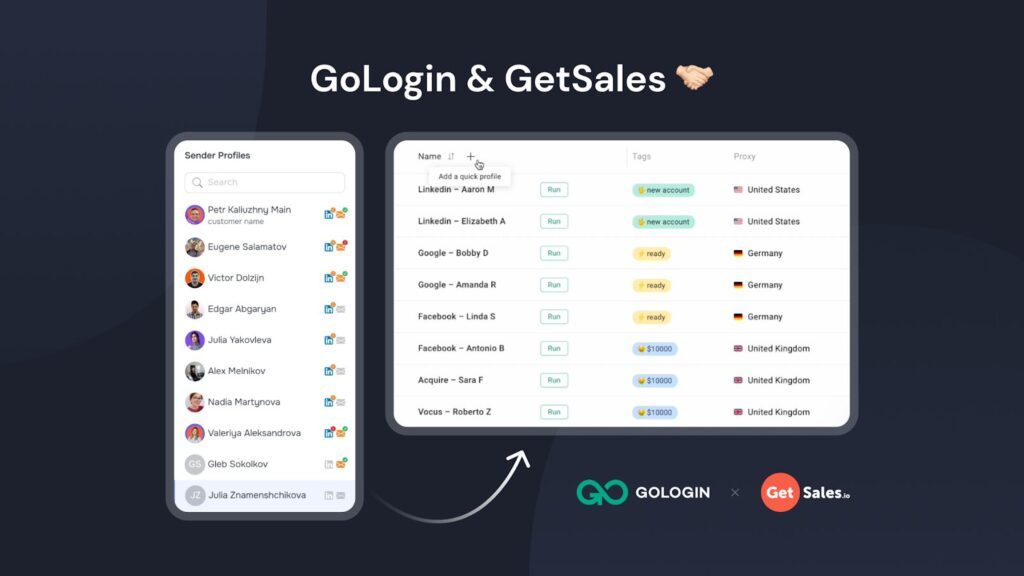
We decided the best way to protect our users was to partner with the industry leader: GoLogin. Instead of building a basic in-house emulation tool, we embedded GoLogin’s powerful technology directly into the GetSales.io interface.
GoLogin maintains a large Research & Development team dedicated to one goal: staying ahead of the detection algorithms used by Facebook, Google, and LinkedIn. By using their engine, GetSales makes sure every LinkedIn sender within our platform runs in its own isolated sandbox. This delivers zero data leakage between accounts; to LinkedIn, each user appears to be a separate person working on a unique computer, forming the backbone of your LinkedIn automation safety.
GoLogin integration offers a powerful feature we call cookie injection. Websites like Canva and Notion use the LinkedIn Tag Manager to track users. When you log into these platforms inside your GetSales cloud session, you build a “Human Trust Trail.” When LinkedIn’s security system scans your session, it sees a rich history of cookies from other real-world platforms. This validates you as a legitimate professional browsing the web, not a sterile bot account built only for outreach.
Because we build our platform on this digital twin logic, our users avoid constant logouts and suspicious activity flags. We neutralize the technical smell of automation, allowing your team to scale without the fear of your infrastructure failing during the next LinkedIn update.
Layer 2: Managing the origin of the connection
To emulate a real human session and maintain LinkedIn automation safety, you need a reliable proxy server. After testing different providers and payment models—from static IP rental to metered traffic routing—our team selected Bright Data as our core infrastructure partner.
These top-tier residential proxies for LinkedIn establish a stable and highly reputable digital “origin.” Because they resolve as authentic residential connections within the correct country, they rarely trigger the security filters that often block cheaper, lower-quality proxy connections.
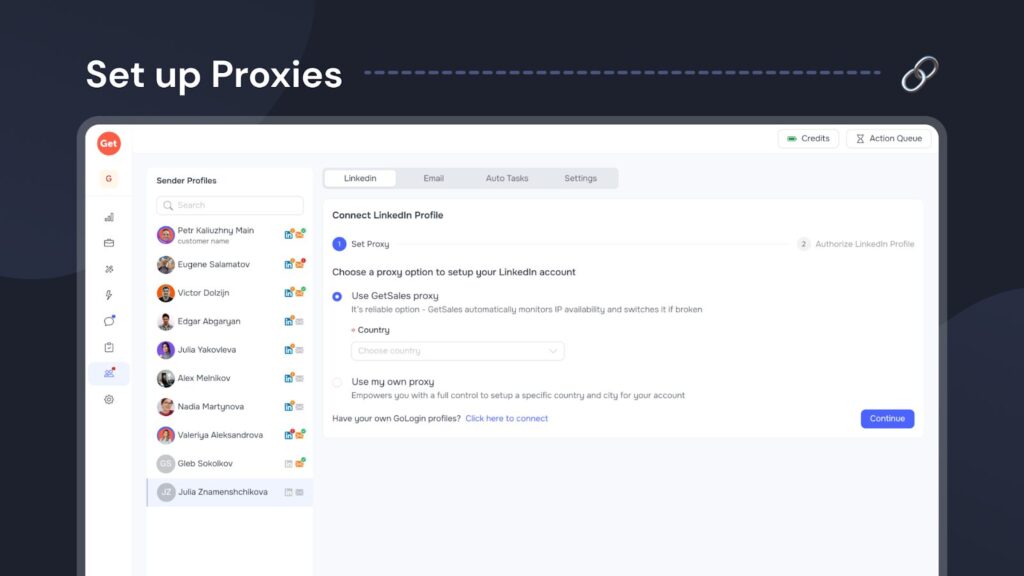
Every GetSales subscription includes access to these premium Bright Data proxies; however, teams also have the flexibility to bring their own proxy configuration. Utilizing this robust network layer solves three critical issues for GTM teams: we eliminate travel-based identity flags by matching the IP to the profile’s region, we avoid the reputation risk associated with VPNs and server-farm IPs, and we prevent automation downtime caused by unstable connections.
Layer 3: Maintaining a single session
LinkedIn creates a unique session every time you log in from a new device. If you access your account simultaneously from a personal computer and an outreach tool — or if you switch VPN locations — LinkedIn detects multiple active sessions. For the platform’s security, this “session jumping” is a primary sign of bot activity or account compromise. For agencies managing client profiles, maintaining a single, stable connection is nearly impossible without immediately triggering an identity violation flag.
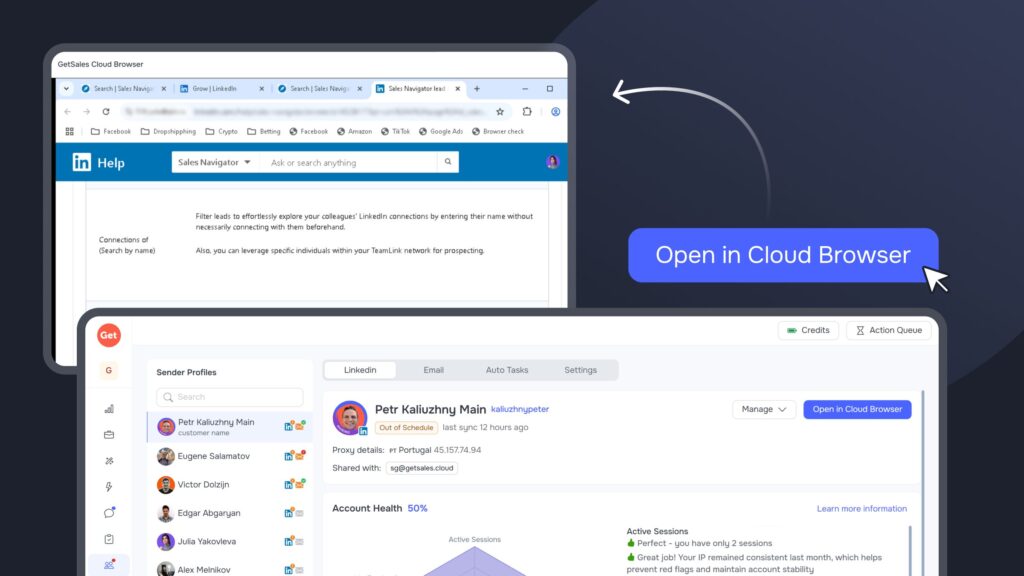
GetSales solves this with our Single Session Protection architecture, built around GoLogin and our integrated Cloud Browser. Instead of creating new sessions, our infrastructure lets you maintain one persistent, active connection per account. This means work resumes directly from a secure cloud environment where the profile stays logged in, mimicking a real user who keeps their browser tab open for weeks. This process also lets your team manage client accounts without ever sharing sensitive 2FA secrets or passwords, ensuring your technical footprint remains unified and hidden from session trackers, which highly improves LinkedIn automation safety.
Layer 4: Imitating human activity
To keep your automations safe, they must consistently mimic real human behavior. LinkedIn automation safety depends on this; the platform detects high-risk signals like sending messages and connection requests simultaneously or at mechanical intervals. Furthermore, an account should never show a 24/7 “online” status. New accounts specifically require a steady warm-up, so you must avoid sending the full volume of connection requests on day one.
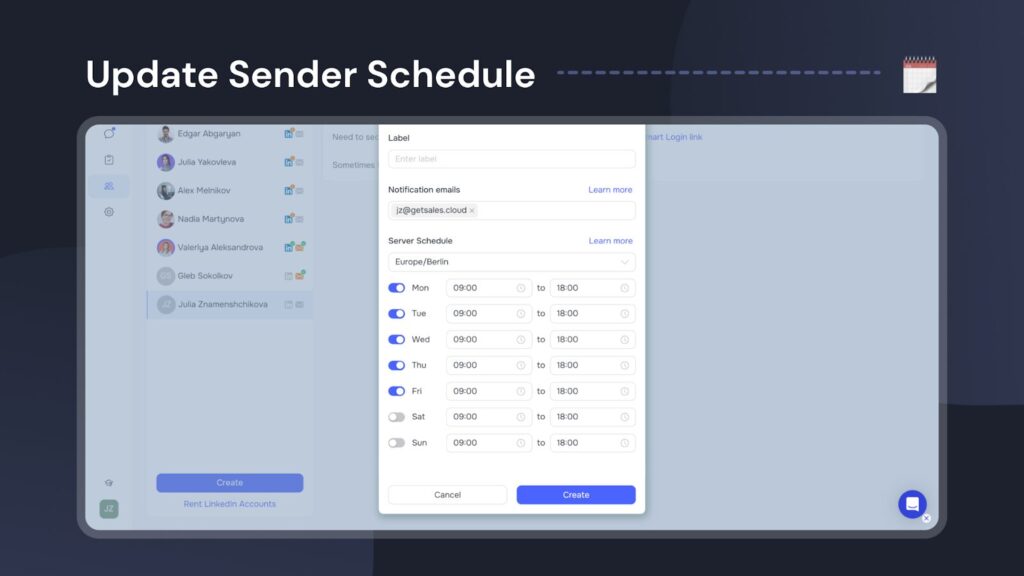
We developed several features to help you simulate this human activity effectively. First, you can set specific operating schedules for your senders and automations. This makes sure your account stays offline during hours when a typical professional is out of office.
We provide a dedicated solution for steady account warm-up using Smart Limits, which calculate safe daily action volumes based on each account’s unique health score. These limits automatically regulate how many actions a sender performs daily, preventing you from triggering LinkedIn’s security alerts. Our platform also notifies you instantly when a sender reaches their safe connection limit.
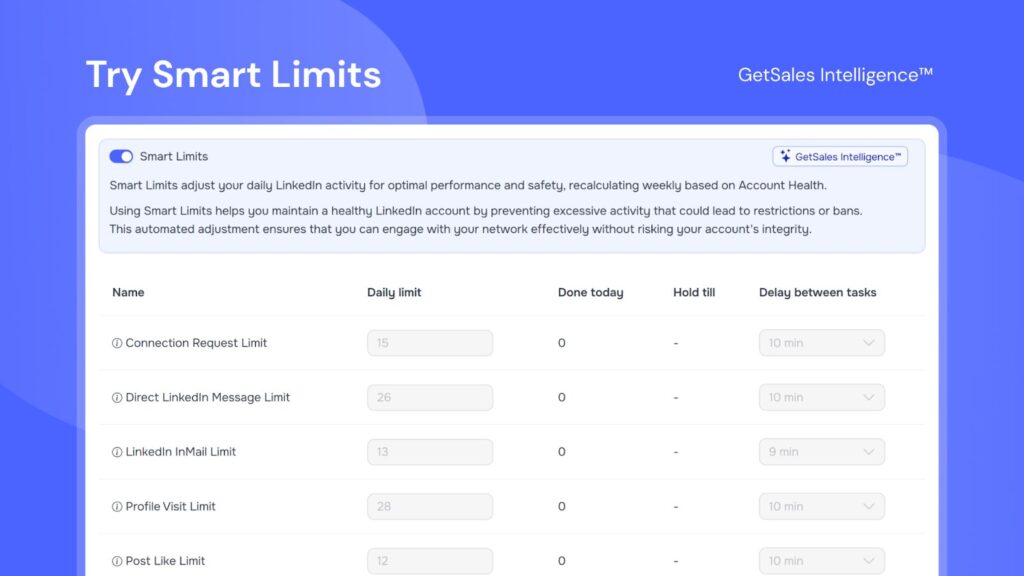
Additionally, you can set specific delays between actions within the workflow builder. Our system automatically adjusts the task volume for each sender to ensure all delays are randomized, which effectively shields your accounts from LinkedIn’s penalty flags.
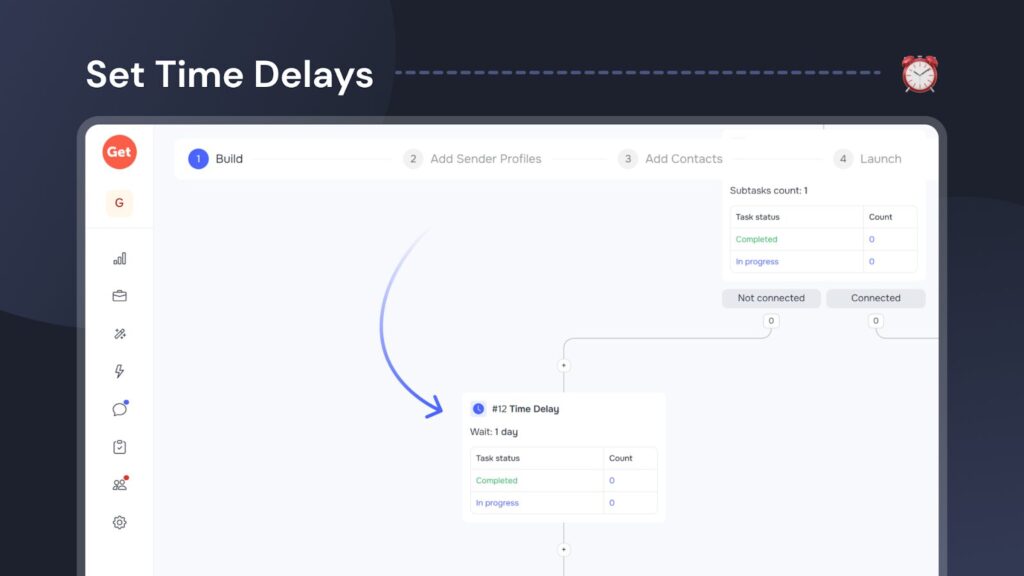
You can apply these randomized delays not just to social actions like connecting and messaging, but also to automated scraping tasks within GetSales. This is a crucial safety feature because many LinkedIn automation tools in 2026 allow users to scrape data unnaturally — for instance, by pulling 2,500+ profiles instantly. This type of mass, high-velocity data retrieval creates a massive red flag for LinkedIn, often resulting in account restrictions. GetSales mitigates this risk by integrating the same controlled pacing into our data collection processes.
Layer 5: Avoid getting to spam box
Prospects often report irrelevant or poorly targeted outreach, sending a critical signal directly to LinkedIn’s security. This negative feedback quickly escalates the risk of an account ban. To avoid being flagged for spam or harassment, you must ensure high-quality content and avoid sending long, unsolicited walls of text. LinkedIn’s filters automatically send suspicious messages to the “Other” or spam folders. Moreover, if the algorithm determines your messages are consistently ignored, it might suppress your profile’s visibility.
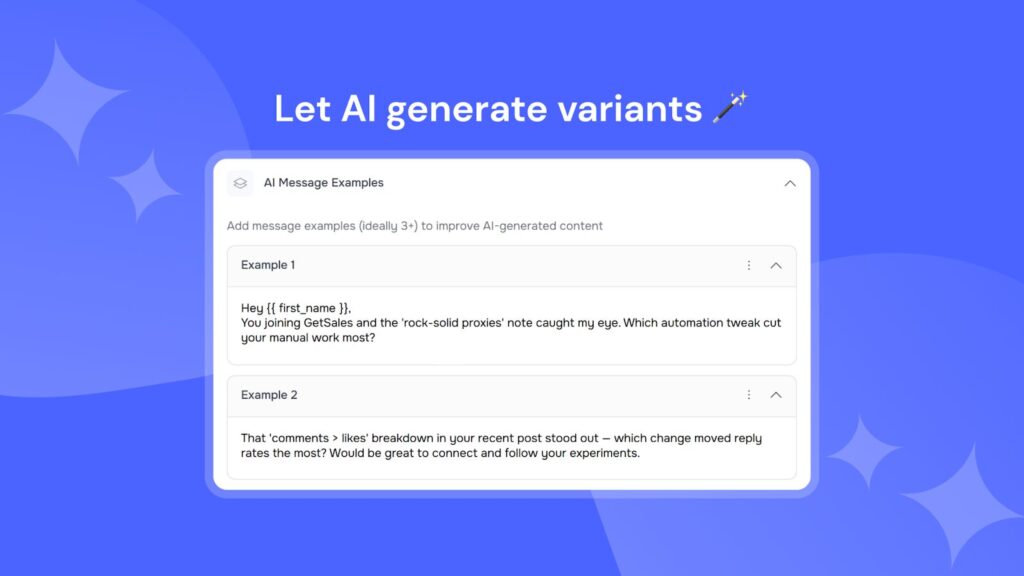
Within GetSales, we help you control this signal by letting you generate multiple message variations using our AI templates and native chatbot integration. You can also utilize spintax to rotate through various text versions. This dynamic approach makes sure your outreach remains unique, preventing you from triggering pattern-detection filters that flag accounts sending identical scripts to every lead.
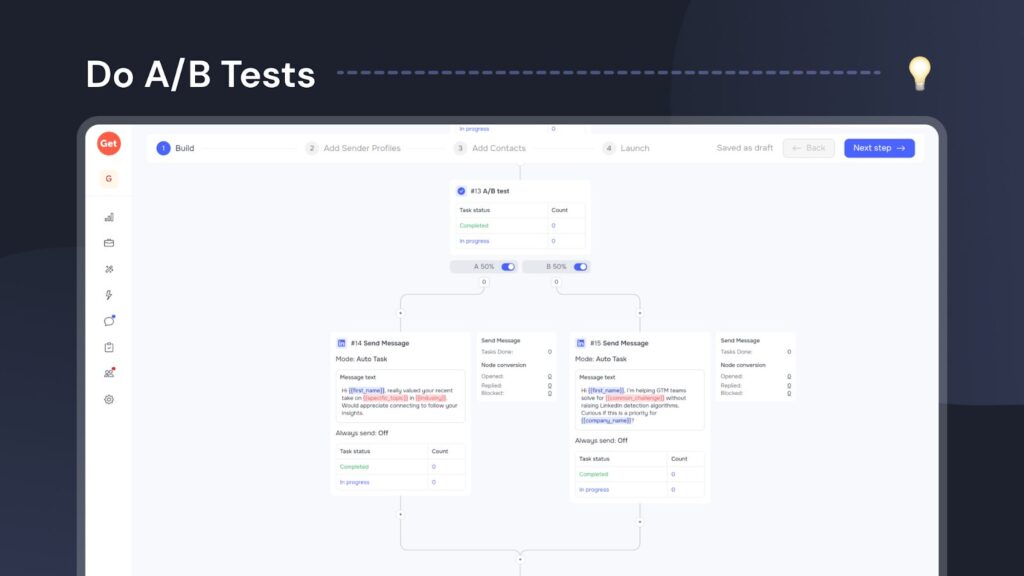
Beyond rotating message variations, you can directly test different outreach approaches using A/B testing. Set up a dedicated testing node within your automation workflow to compare distinct hooks and offers. This lets you clearly see which approach generates the highest engagement and the lowest number of negative spam reports, helping you to adjust your LinkedIn automation safety strategy.
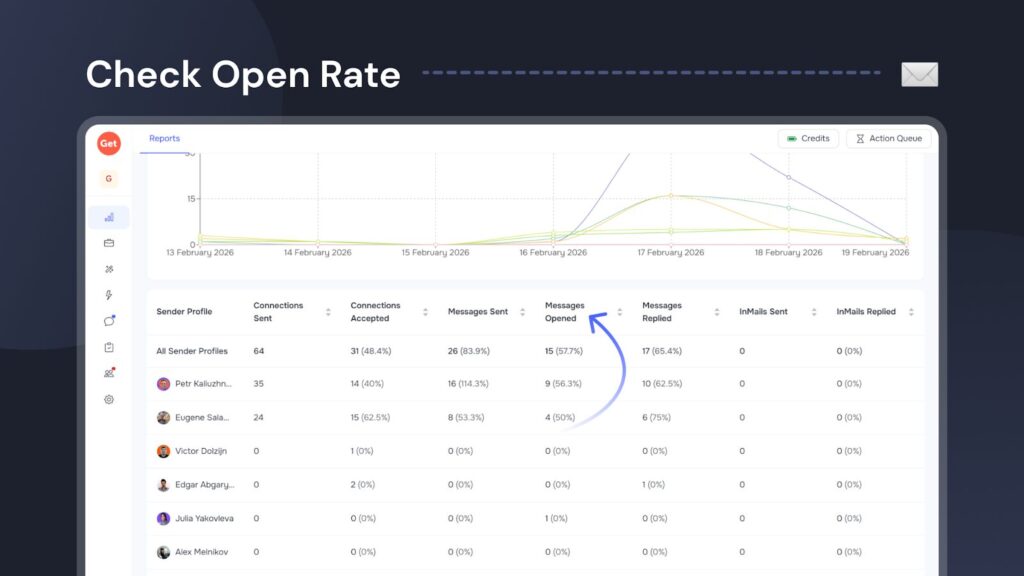
Finally, GetSales lets you track the open rates for your individual senders and specific campaigns. A sudden drop in open rates signals that a sender’s account may have been shadow-banned or is facing deliverability issues. This real-time oversight gives you a chance to reassess your strategy and fix problems before they escalate into a LinkedIn restriction.
Layer 6: Gaining safety oversight
With so many LinkedIn security triggers to monitor, it’s easy to miss critical safety signals, especially when managing dozens of profiles at once. GetSales builds in clear mechanisms to identify exactly when your assets face risk before a restriction occurs.
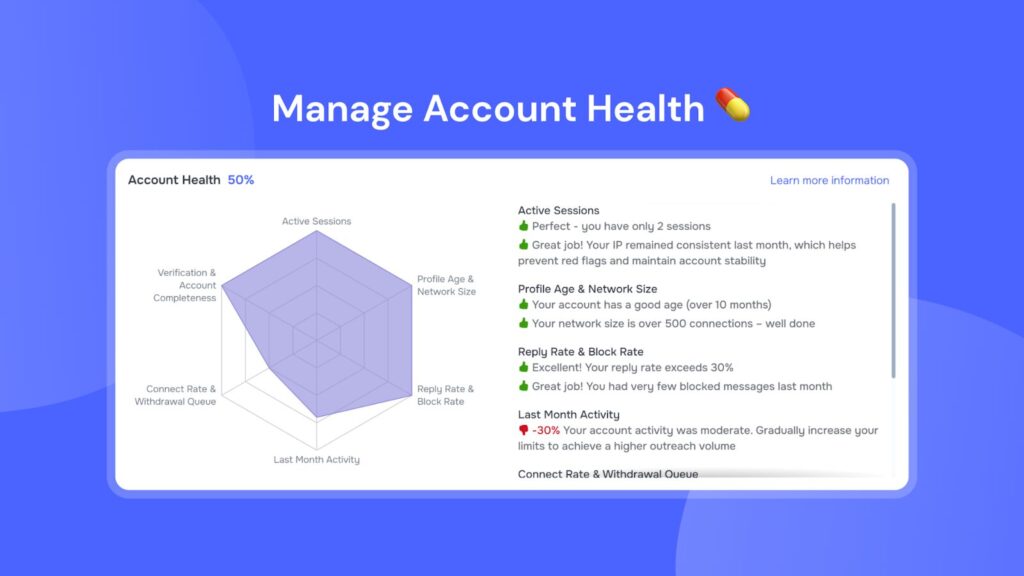
First, monitor the Account Health Score dashboard. This centralizes data on the most common issues, which we use to calculate your Smart Limits. This tells you exactly which automated behaviors to adjust to maintain optimal LinkedIn automation safety. To empower your team, we also include actionable advice within the interface, giving SDRs clear, practical steps to improve an account’s health the moment the score drops.
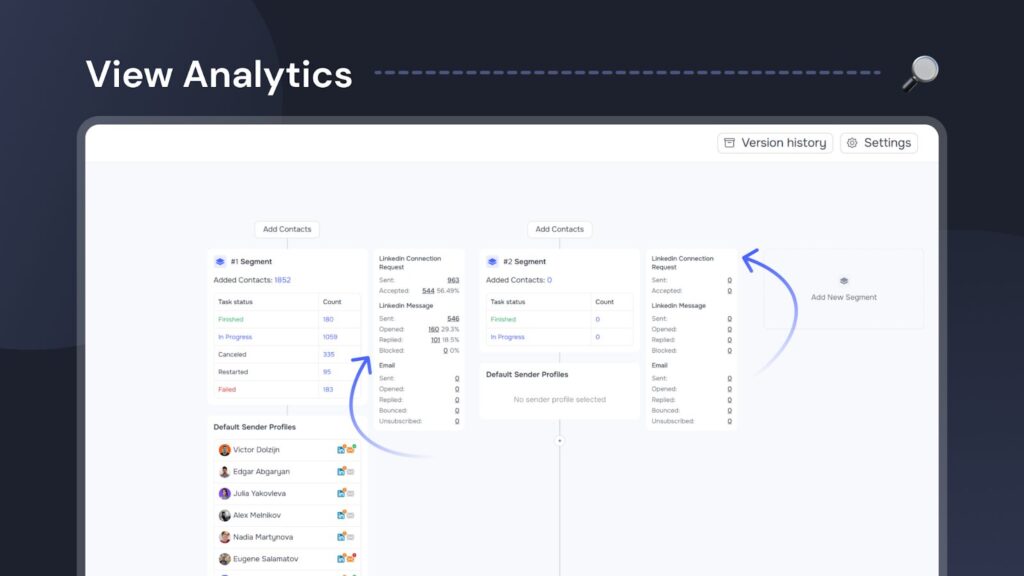
Additionally, you can oversee the status of all your senders and campaigns using a unified dashboard. We integrated granular analytics directly into each automation’s interface, letting you match performance data with safety metrics. By monitoring reply rates and success indicators in real-time, you ensure your outreach remains relevant and well-received, which effectively cuts down on manual spam reports that trigger bans
Wrapping up
Navigating LinkedIn’s complex restrictions requires more than a basic LinkedIn automation tool; it demands institutional-grade infrastructure. The market offers countless new platforms for posting, scraping, and outreach, but few build safety into their foundation. Before you integrate any new technology, perform technical due diligence: How does the software emulate sessions? How does it isolate browser fingerprinting LinkedIn data? What is its underlying behavioral biometrics logic? Ignoring these questions is the fastest path to losing valuable professional assets.
To show the power of structured outreach, consider this final story. We recently met a client who expanded GetSales usage from their sales team to HR. Auditing their previous year’s data revealed a startling finding: the sales team using our LinkedIn automation safety platform lost significantly fewer accounts than their HR team, which worked entirely manually. This case study confirms our core philosophy: when supported by sophisticated multi-layered safety, automated outreach is technically safer than unpredictable manual intervention.
If you seek the ability to scale your LinkedIn outreach without the constant risk of losing accounts, you have found the solution. When you’re ready to stop gambling with your assets and start building a resilient sales infrastructure — you know who to call 😉